Home | Contact Us | Submit Troubleshooting Info | Search | Help


    Output | Software Solutions | Proofing | Color, Screening and Calibration | Scanning | Digital Photography | Consumables | POS


Calibrating the paper/metal detector on the Magnus 800 autoloader’s paper picker system


Product

 
  • Kodak® Magnus™ 800 single-cassette autoloader
  • Kodak Magnus 800 multi-cassette autoloader

Background


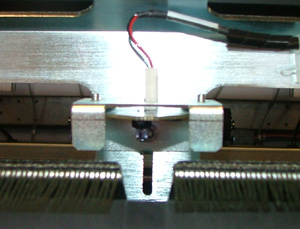
The paper/metal detector (part number 503-00203A) on the autoloader must be correctly positioned, otherwise the paper picker system may fail.


Requirements


3-mm hex key


Procedure


Testing the functionality of the paper/metal detector

Verify that the paper/metal detector is correctly positioned and functioning.

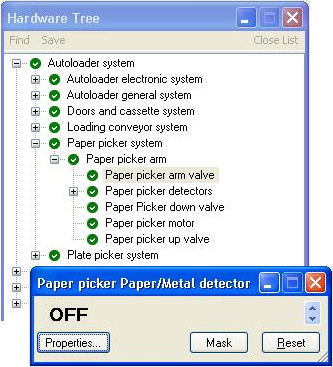
  • When the paper/metal detector detects paper, the paper/metal LED (located on the paper picker system) lights up green and the status of the detector in Kodak Magnus 800 Controller (Paper picker Paper/Metal detector dialog box) appears as OFF.
  • When the paper/metal detector detects a plate, the paper/metal LED is not lit, and the status of the detector in Magnus 800 Controller appears as ON.
  1. Make sure that a plate stack is loaded into the autoloader.
  2. Raise the two autoloader top covers.
  3. Open the paper disposal door and raise the paper disposal panel.
  4. Insert a bypass key into the bypass switch, located on the left side of the paper disposal door.
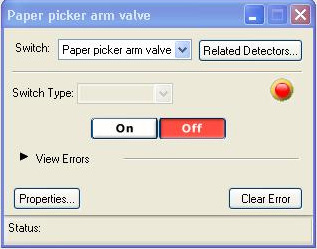
  5. In Magnus 800 Controller, locate and open the following dialog boxes:
    • Paper picker Paper/Metal detector dialog box


    • Paper picker arm valve dialog box.


  6. In the Paper picker arm valve dialog box, click On to lower the paper picker system.
  7. Place a slip sheet on the top of the plate stack and then remove the slip sheet.
    Make sure the two different types of media (paper and plate) cause the LED (located on the paper picker system) and the detector status (viewed in the Paper picker Paper/Metal detector dialog box) to react as described in the table below.

    Media
    Paper picker Paper/Metal detector in
    Magnus 800 Controller
    LED on paper picker system
    Paper
    Off
    Lights up green
    Plate
    On
    Not lit

    If the results are different than those described in the table, adjust the position of the paper/metal detector bracket.

Adjusting the position of the paper/metal detector bracket

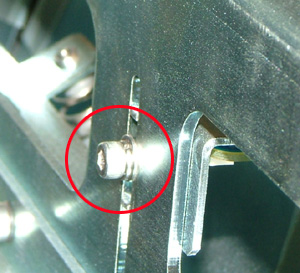
  1. Use a 3-mm hex key to slightly loosen the screw securing the paper/metal detector bracket to the paper picker system.


  2. Slightly raise or lower the detector bracket along its vertical groove until both the LED and the status of the Paper/Metal detector react correctly (see table).
  3. When the paper/metal detector is in its optimum position, raise the bracket approximately 5 mm, and retighten the screw securing the bracket to the paper picker system.

Test


Load and unload several plates, and check the following:

  • Paper/metal detector LED is off when it detects a plate and lights up green when it detects paper.
  • Detector status appears as on when a plate is uppermost on the stack, and appears as off when a slip sheet is uppermost on the stack.

Technical contact
 

Content owner: Yaron Shifman
See the Escalation page for escalation contacts.

Date submitted
 

18 Jun 2007


    Copyright © 2005 Creo Inc. All rights reserved. Confidential. Back to top.