Home | Contact Us | Submit Troubleshooting Info | Search | Help


    Output | Software Solutions | Proofing | Color, Screening and Calibration | Scanning | Digital Photography | Consumables | POS


Replacement LIONEL board not responding


Product

  LIONEL boards

Error


You cannot detect replacement LIONEL boards using the version checker or the sio diag command. You also cannot download firmware to the LIONEL board. There is no error code for this condition.


Cause


The replacement LIONEL board was shipped in gateway mode (gateway mode is used for certain configurations, such as a LIONEL board in a UDRC). If the board is in gateway mode or local mode, it does not respond on the CANBUS.


Solution


You must switch the LIONEL board to ASCII mode. There are two ways to do this: using the SCON firmware installer, or using terminal software.

Using the SCON firmware installer
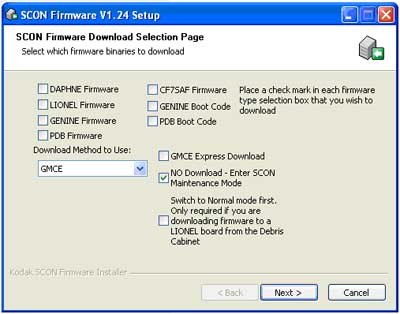
Use version 1.24 or higher of the SCON firmware installer—SconFirmware1.24_B2.exe.

  1. Connect a serial cable from your computer's COM port to the serial port on the LIONEL board.
  2. Run SconFirmware1.24_B2.exe.
  3. The SCON Firmware Setup window opens.
  4. Click the No Download - Enter SCON Maintenance Mode check box.
  5. Click Next.
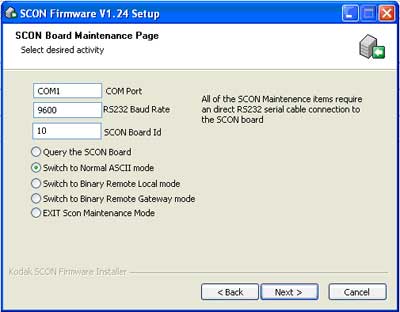
  6. In the next setup window:
    • Select the COM port that you are using.
    • Leave the RS232 baud rate set to 9600.
    • Enter the board ID. The board ID is a two-digit hex number that can be obtained from the output device schematics.
    • Select the Switch to Normal ASCII mode option.

  7. Click Next.

The LIONEL board is now switched to ASCII mode.

Using terminal software
Use terminal software such as hyperterminal, procomm, or term.exe. Read through all of the instructions before starting this procedure.

  1. Connect a serial cable from your computer's COM port to the serial port on the LIONEL board.
  2. Run the terminal software and set it to 9600, 8-bits, No parity, 1 stop bit (9600 8N1).
  3. Press the Reset button on the LIONEL board.
    It should immediately output the following string: Override Binary Mode? (Y/N).
  4. Press Y within three seconds of pressing the Reset button. The LIONEL board switches to ASCII mode and resets.
    Note: Wait for it to complete the reset. If you press any key during this time, the board switches back to binary (gateway) mode.

When the board has finished resetting and is in ASCII mode, the Heartbeat LED flashes 1 second on, 1 second off (running main firmware), or 0.5 seconds on, 0.5 seconds off (running boot code).


See also


Technical contact(s)
 

Al Edge

Submitted by
 

Al Edge

Date submitted
 

22 May 2007


    Copyright © 2005 Creo Inc. All rights reserved. Confidential. Back to top.