Home | Contact Us | Submit Troubleshooting Info | Search | Help


    Output | Software Solutions | Proofing | Color, Screening and Calibration | Scanning | Digital Photography | Consumables | POS


Punch registration push bar not working properly


Product


Magnus VLF MCU,CL


Component


Punch registration bar.


Error


Registration push bar not working properly.


Symptoms


Possible symptoms of the registration bar not working properly are:

  1. One side of the registration push bar is slower/faster than the other.
  2. One side has a sticky spot.
  3. Side registration is lost after reaching the side punch position.


Cause/Solution

 
  1. One side of the registration push bar is slower/faster than the other.
    • Cylinder is worn and more air is leaking past the seal than it should.
    • Orifices are not properly sized.
    • Air bearing is not working properly on one side.
    • Registration bar sheetmetal or air bearing mounts are bent and not allowing proper movement of the bar.
    • Air line lengths are wrong. The length and size of airlines can affect the speed of the push cylinders.
    • The plate center is different than firmware has calculated (firmware changes the amount of pressure in each cylinder depending on the centerline of the plate).
  2. One side has a sticky spot.
    • One cylinder is damaged.
    • The PEEK tape under the air bearing has been damaged.
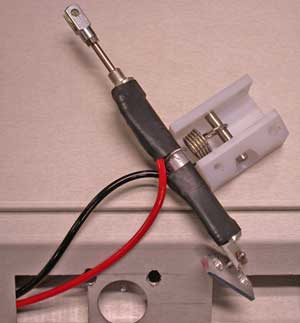
    • Possible interference between the cylinder and the registration bar. There is minimal clearance between the body and air fittings of the push cylinders and the components on the registration bar. There is a heat-shrink protector added to the outside of the push cylinder to try to minimize this.
  3. Side registration is lost after reaching the side punch position.
    • Spring is not working properly. There is a spring on the away cylinder which takes out the side force component from the cylinder as the registration bar is moved laterally. If this is not working properly, the plate may come off the registration side pin when the bar stops.
    • Possibly the end of travel has been reached on the away side of the registration bar. This can happen if the plate is not being positioned on the registration bar properly or if the plate size is different than expected in the subscan. The bearing on the registration bar that runs on the re-centering cam surface when the registration bar is retracted can cause end of travel condition if the registration bar is not forward enough.

Registration bar removal


To troubleshoot mechanisms inside the registration bar, you must remove the registration bar and plate deflector assembly (500-03541A). To do this:

  1. Disconnect all the tubes and the cable going to the plate sensor inside the sheet metal. There are 3 M5 screws on each side with Belleville washers that fasten the sheet metal side flanges of the deflector to the steel side plates of the tilting side registration mechanism 500-03542A. Note: there is a single short screw on each side near the pivot that is required for clearance issues. It is a long piece and is best removed with 2 people, however, this can be done by one person if you put some foam underneath the part while disconnecting each side and then removing it while supporting it evenly.
  2. Once the assembly has been removed, place it on a suitable surface for further disassembly/troubleshooting.
  3. The registration bar can be removed by taking out the two M4 screws that mount the rod ends of the registration bar actuation cylinders to the registration bar (there are two access holes on the top of the registration bar to do this). Once the screws are removed, the registration bar can be pulled away from the cylinders and rotated up and out of the deflector pan sheet metal. Flip the bar over and all the components can be accessed from this orientation.

Installation is the reverse of removal. To maintain the smooth operation of the registration bar, it is important to ensure that the cables and tubes are reattached and strain relieved as before.


Technical contact(s)
 

Rob Bouchal

Submitted by
 

Rob Bouchal

Date submitted
 

14 Jul 2006


    Copyright © 2005 Creo Inc. All rights reserved. Confidential. Back to top.