|
Product |
|
Kodak® ThermoFlex™Wide II
|
|
Component |
|
Tailstock bearing |
|
Error |
|
Focus learn failure |
|
Symptoms |
|
- Device is noisy during plotting
- Focus learn failures increase in frequency over time
- If you type
FOC GET TABLE after a focus learn error, there are no saturated values in the focus table.
|
|
Cause |
|
Faulty or worn tailstock bearing |
|
Solution |
|
- Confirm that a faulty tailstock bearing is the cause of the focus learn failures:
- Load a plate.
- Connect to the head and set verbosity:
TFX>> eng

TFX>> vbs enable all 2

TFX>> vbs enable foc 7
- Move the carriage to the plot start location and check the focus learn values:
Flexo>> carriage moveto <position> where position is the start position value under SET PRD SHIMAGESTARTPOS
Flexo>> plot headtest <main scan length> where the value is not greater than the loaded plate size minus 25.4 mm (1 in.)
Flexo>> focus learn - wait for Command Complete
Flexo>> focus off

Flexo>> plot stop

TFX>> foc get table
- Record the values and paste them into a spreadsheet.
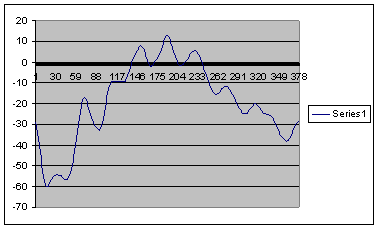
- Create a graph from the focus learn values.
- If the graph resembles that shown below, the variations and oscillations indicate a weak tailstock bearing.
- A temporary workaround that can be used until you replace the tails tock bearing is to set
FOC STRICTERRORCHECK to FALSE.
This will reduce the number of focus learn errors to 20 micron deviations over 30 samples.
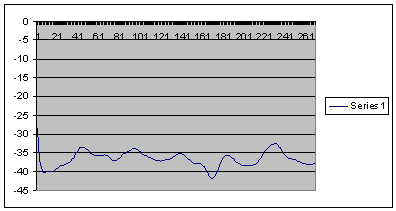
- Replace the tailstock bearing.
- Repeat the focus learn measurements and create another graph. It should look something like the one below.
|
|
See also |
|
|
|
Technical contact(s) |
|
Jim Third |
Submitted by |
|
Frederic Mayot |
Date submitted |
|
18 Oct 2007 |

