|
Product |
|
Kodak ThermoFlex Narrow |
|
Background |
|
ThermoFlex Narrow platesetters are now connected to the Universal Debris
Removal Cabinet (UDRC). However, earlier versions were connected to the
Fuchs vacuum pump. This procedure describes how to connect the Fuchs vacuum
pump to the ThermoFlex Narrow platesetter.
|
|
Procedure |
|
- In ThermoFlex Controller, send the carriage to mid position, and then
open the rear door.
- Manually open the front door.
- Turn off ThermoFlex Controller and then turn off the electricity.
- Lift up the unload tray.
Note: On some of the older models, you must remove the four screws
from the unload tray and remove the unload tray.
- Open the front and rear panels.
- Position the Fuchs vacuum pump as close as possible to the platesetter.
- To prevent leakage, carefully spread RTV silicon
glue along both ends of the 5 M vacuum hose.
- Connect one end of the 5 M vacuum hose to the platesetter's exit tube
in the back of the platesetter, on the lower right side. Connect the
other end of the hose to the Fuchs vacuum pump.
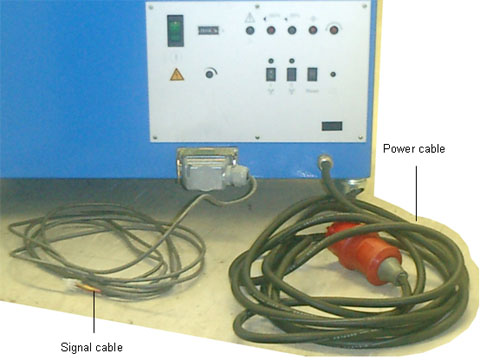
- Connect one end of the 5 M signal cable to the platesetter near the
vacuum hose connection. Connect the other end of the signal cable to
the vacuum pump.
- Connect the power cable from the socket on the Fuchs vacuum pump to
the power socket on the wall.
Note: If the line power is 110 VAC, connect a 3Ph 220 transformer
(212A10620) to the power cable.
|
|
Images |
|

|
|
Test |
|
- Turn on the vacuum pump.
- If a red LED on the pump is on, turn off the pump, disconnect the
power cable from the vacuum pump and reverse the
two phases of the pump connector.
|
|
See also |
|
Fuchs Vacuum Pump Operating Instructions (PN 655-00008)
|
|
Technical contact(s) |
|
Content owner: Viki Arviv See the Escalation page for escalation contacts. |
Date submitted |
|
11 Jul 2006
|