

Home | Contact Us | Submit Troubleshooting Info | Search | Help
Output | Software Solutions | Proofing | Color, Screening and Calibration | Scanning | Digital Photography | Consumables | POS
Home | Contact Us | Submit Troubleshooting Info | Search | Help
Output | Software Solutions | Proofing | Color, Screening and Calibration | Scanning | Digital Photography | Consumables | POS
|
|
||
Product |
Trendsetter NEWS with Dual Bay option | |
Component |
LIONEL (little input/output node electronics) board | |
|
|
||
Background |
The Trendsetter NEWS device with the Dual Bay option has a LIONEL board in the power box to provide extra I/O capability for the dual bay plate separator arms. If this LIONEL board fails, the replacement board is shipped configured for a mode of operation (Mode 3, communication over CAN bus disabled) that is suitable for use in the UDRC (universal debris removal cabinet), but not in the NEWS Dual Bay power box. For the latter application, the LIONEL board's mode of operation needs to be changed to Normal (CAN bus enabled). |
|
|
|
||
Requirements |
|
|
|
|
||
Procedure |
To replace a failed LIONEL board:
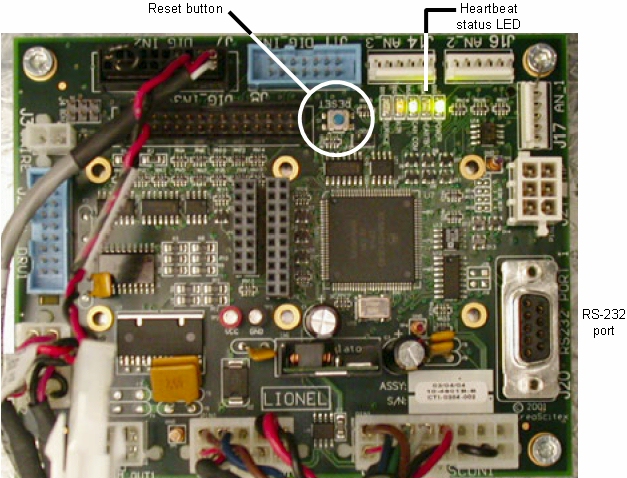
To configure the new LIONEL board with the correct mode of operation (Normal):Before you begin, check the Heartbeat status LED to see whether the LIONEL board is already in Normal Operation mode. If so, the LED flashes on and off at fixed one-second intervals. If the LED flashes at any other intervals, perform the procedure below.
|
|
 |
||
|
|
||
Test |
Confirm that the Heartbeat status LED now flashes on and off at fixed one-second intervals. If so, replace the power box access panel. | |
|
|
||
Technical contact(s) |
Content owner: Ray Levasseur
|
|
Date submitted |
22 Apr 2005 |
|