|
Product |
|
Trendsetter 400/800 II (MCE)
|
|
Machines affected |
|
Serial number TM747 and higher |
|
Component |
|
drum amplifier - part number 601-00032 |
|
Error |
|
MDH: Drum not at expected position, position may have shifted because of outside interaction. |
|
Causes |
|
- The encoder is not indicating the proper location.
- The drum moved after it was sent to the load position.
- The load position is not set properly.
- The drum is not moving because the drum amp has faled or is in an unknown state.
|
|
Solution |
|
- Check the encoder and verify the load position.
- If both the encoder and load position are okay and you suspect a problem with the drum amp:
- Remove any media that is loaded on the drum
- Reset the device.
- If the device fails to initialize because the drum failed to move, check to make sure that there is nothing obstructing the free movement of the drum.
- Open the power box panel, and turn on the power switch.
- In Service Shell, use
drum init to initialize the drum.
- If the drum failed to move during the initialization, use a small mirror to check the drum amp status LED. The yellow drum amp status LED is located on the top of the drum amp near control signal connector J5 (near the middle).
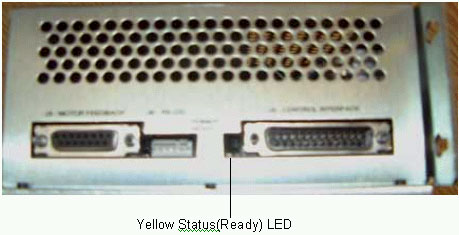
In normal RUN mode(after the drum is initialized), the yellow LED should be on.
- If the drum amp status LED is not on or is flashing, then the drum amp is in some type of error condition.
Refer to the status LED table in ACE 1200 drum amplifier for additional information.
- If the error condition persists, replace the drum amp.
|
|
See also |
|
ACE 1200 drum amplifier |
|
Technical contact(s) |
|
Cedric Galere |
Submitted by |
|
Ming Zhang |
Date submitted |
|
03 May 2005 |

