Home | Contact Us | Submit Troubleshooting Info | Search | Help
Output | Software Solutions | Proofing | Color, Screening and Calibration | Scanning | Digital Photography | Consumables | POS
Home | Contact Us | Submit Troubleshooting Info | Search | Help
Output | Software Solutions | Proofing | Color, Screening and Calibration | Scanning | Digital Photography | Consumables | POS
|
|
||
Product |
|
|
|
|
||
Background |
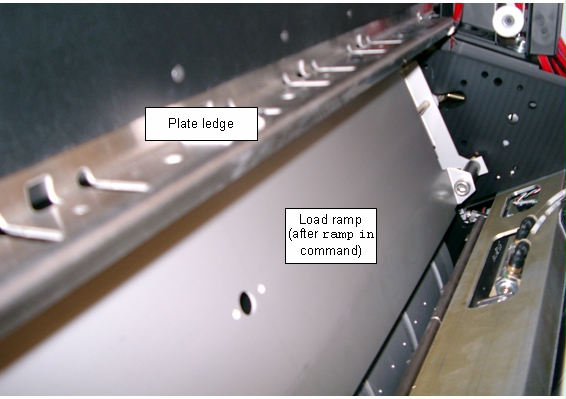
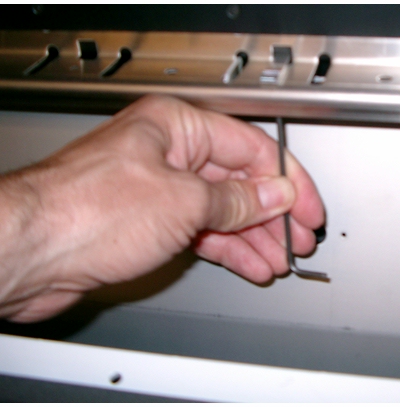
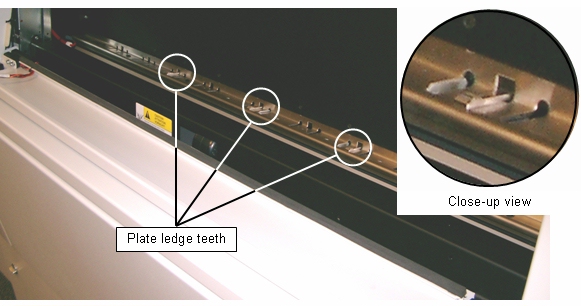
Use this procedure when you need to replace or reposition the plate ledge teeth on the load table of a Trendsetter Autoloader or NEWS device. |
|
|
|
||
Procedure |
|
|
 |
||
|
Note: Trendsetter NEWS devices have four plate
ledge teeth installed. Trendsetter Autoloader has three plate ledge teeth.
|
||
|
||
|
|
||
|
||
|
|
||
Test |
Pick several plates with the bay full and then pick several more with the bay almost empty. Check to make sure the plates make contact with the teeth when the picker performs its wrist out motion. |
|
|
|
||
See also |
Plate Ledge section of Load table adjustment | |
|
|
||
Technical contact(s) |
Content owner: Ray Levasseur
|
|
Date submitted |
17 Aug 2004 |
|