Solution
|
|
Solution to Cause 1:
MCE CR 2.0 or later (TS AL) or 2.1 or later (TS NEWS) installed on output device with old pulley
-
Determine whether the output device has new
firmware and an old pulley.
-
In Service Shell, use the Version Checker
tool to see what controlled release version is installed.
-
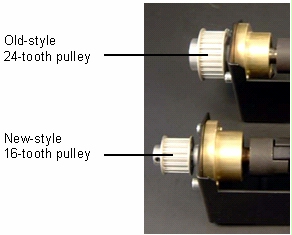
Check the output device serial number. If it
is TM259 or later (Trendsetter AL) or NM126 or later
(Trendsetter NEWS), it should already have the new 16-tooth
unload table stepper motor pulley. If the device serial numbers
are earlier than TM259 or NM126, visually check the pulley to
see whether it is the old 24-tooth version.

-
If the output device has MCE CR 2.0 or later (TS AL) or 2.1 or later (TS NEWS) installed
and the unload table stepper motor pulley is the old 24-tooth version,
start Service Shell and temporarily change the mhauto
NVS parameters to work with the 24-tooth pulley.
set mhauto UnloaderSPM
1.7 set mhauto UnloaderMSR 4
- Order kit # 512-00072A (non-rotator) or 512-00073A (rotator) for FCO
CA02183 (new 16-tooth pulley). When the kit arrives, perform the upgrade procedure and mark item #2 on the AL/NEWS ECO 100 label.
IMPORTANT: After installing the new pulley and belt guide, you must
ensure that mhauto UnloaderMSR is set to 2 and mhauto UnloaderSPM is set
to 2.55 (as described in the upgrade procedure). Otherwise, you run the
risk of damaging the motor and/or cabling.
Solution to Cause 2: Home side unload table
table motor sensor or cable is faulty
- Use the
scan command to check the status of the
AL_SensorTravellerHome I/O.
scan
AL_SensorTravellorHome For
information on interpreting sensor I/O states, see Interpreting MCE Sensor I/O Bit States.
- If necessary, replace the faulty home side unload table
table motor sensor or cable.
|