|
|
Try to determine if this is the cause by listening to the sound of the acceleration.
- If the error occurs on a drum spin command, reduce the vacc parameter:
set drum vacc <value>
If the error only occurs on higher values of vacc (>2-3), check that the
220VAC power going into the drum drive amp (pin 3 and 4 of J1) does not drop during
acceleration.
Note: a Fluke meter may be too slow. Use the analog bar graph scale.
For more information on the connectors, see Main
Drive Amplifier (3244) or Main Drive Amplifier
(VLF) .
- If the error occurs on the drum move command, reduce the pacc parameter:
set drum pacc <value>
- Enter the command drum cal.
Note: The command drum cal only works for drum firmware module 1.09 and
higher. To check the module version, use the command list version.
If the drive amp's dead band has become too wide or too narrow, this command generates an
error message. In this case, replace or recalibrate the drive amp. See CTP Firmware Drum Amplifier Dead-Band Calibration.
- Check that the belt has not come very loose and that the pulley is
not slipping on the shaft.
This is only valid when the error occurs during a plot or drum spin xx command.
- Make sure the encoder disk is not off center (not common).
This is only valid when the error occurs during a drum init or drum spin xx c command.
- Check for objects like slipsheets or cleaning cloths restricting the rotation of the
drum.
- Check the motor hall sensor cable
- Make sure the 5V power into J3 pin 5 is not flaky (VLF Platesetter and VLF Trendsetter
only)
- Enter the command drum cal.
Note: The command drum cal only works for drum firmware module 1.09 and higher. To check
the module version, use the command list version.
If the drive amp's dead band has become too wide or too narrow, this command generates an
error message. In this case, replace or recalibrate the drive amp. See CTP Firmware Drum Amplifier Dead-Band Calibration.
- Check the Hall effect LEDs in the drive amp if applicable. See the LED sequence (3244 or VLF).
- Check the motor hall sensor cable on J3 and at the motor to see if wiggling it makes the
error worse.
- Check that the pulley is not slipping on the motor shaft (not common).
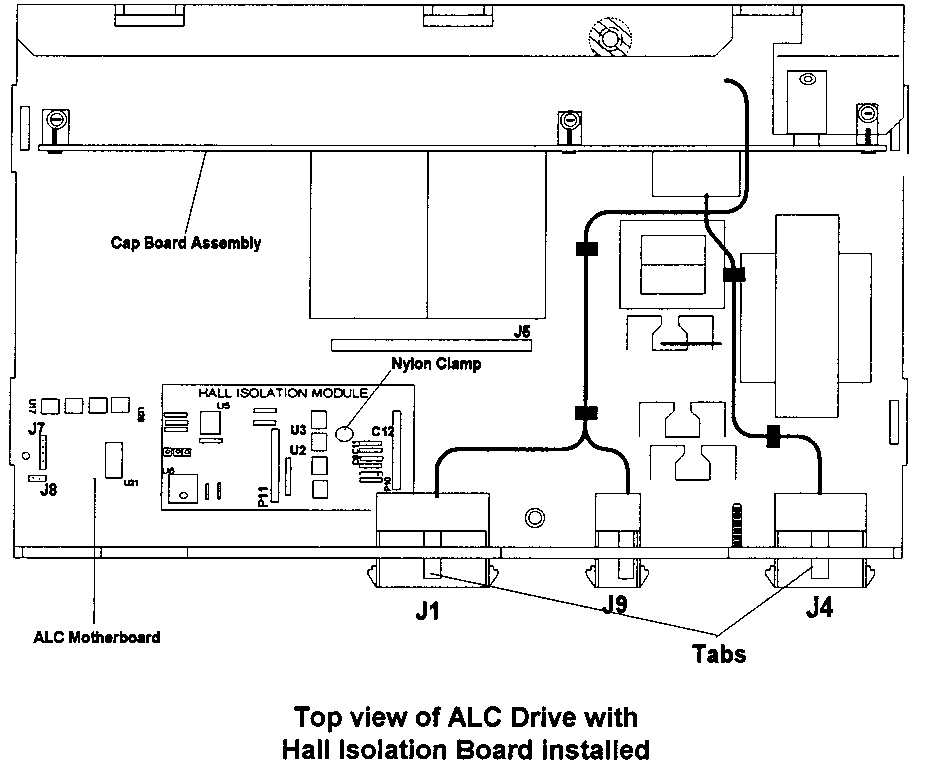
- Check that the Hall isolation board in drum amp is not
loose (older drive amps) or faulty. Very old drives (on 3244s) do not have a hall
isolation board. The newest drives have a plastic stand off that prevents the board coming
loose.
VLF drum PID settings incorrect
Some VLF systems may have the wrong drum PID settings. Try the settings below. If they
do not worsen the situation, then save them.
"set drum <...>"
pgv = 25000
igv = 500
dgv = 0
pgr = 25000
igr = 600
dgr = 0
Note: For ThermoFlex, igr = 500
|