Home | Contact Us | Submit Troubleshooting Info | Search | Help
Output | Software Solutions | Proofing | Color, Screening and Calibration | Scanning | Digital Photography | Consumables | POS
Home | Contact Us | Submit Troubleshooting Info | Search | Help
Output | Software Solutions | Proofing | Color, Screening and Calibration | Scanning | Digital Photography | Consumables | POS
Applies to |
Trendsetter VLF AL |
Priority
|
|
Component |
Power Distribution Board (PDB), version 10-4112G-B or earlier only | ||
Problem |
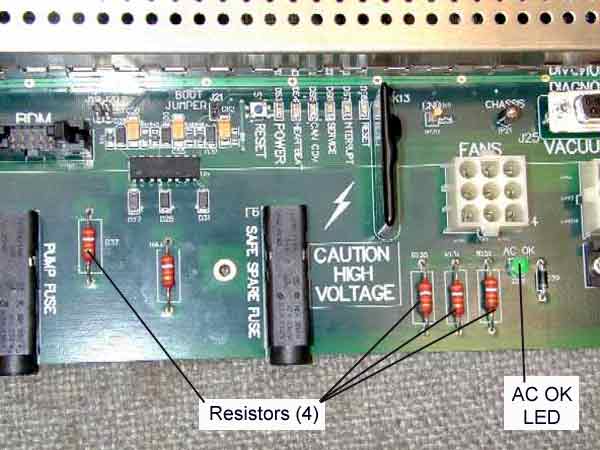
On PDB 10-4112G-B or earlier, the power resistors are too close to the surface of the board (less than 3mm above the surface). They get hot enough that there is a small chance of causing a fire if a resistor were to touch the board surface. | ||
Solution |
Remove four of the five resistors: R37, R120, R131, and R151 only. Also remove the green "AC OK" LED (DS9), since it will no longer work once the resistors are removed. The resistors are not currently being used, so they do not need to be replaced. |
||
Tools needed |
Wire cutters |
||
Procedure |
|
||
Technical contact |
|||
Date submitted |
28 Aug 2002 |
||