

Home | Contact Us | Submit Troubleshooting Info | Search | Help
Output | Software Solutions | Proofing | Color, Screening and Calibration | Scanning | Digital Photography | Consumables | POS
Home | Contact Us | Submit Troubleshooting Info | Search | Help
Output | Software Solutions | Proofing | Color, Screening and Calibration | Scanning | Digital Photography | Consumables | POS
Product |
|
||
Platform |
Intel, Dell 2400 or 6400 |
||
Operating system |
Windows 2000 |
||
Background |
This procedure describes how to connect the SCSI cable from the Prinergy 2.x workstation to the Lotem Quantum device. |
||
Requirements |
Connectivity kit for Lotem 400 Quantum: 22-0192B Connectivity kit for Lotem 800 Quantum: 22-0193B |
||
Procedure |
After installing Prinergy on the workstation and before you install CS Xpose, you need to install the SCSI cable connection between the Prinergy workstation and the Lotem Quantum device.
Attention You must shut down the Lotem Quantum and the Prinergy Workstations before connecting the SCSI cable. If you do not shut down the device and workstation the SCSI will not connect properly and you will have to reinstall 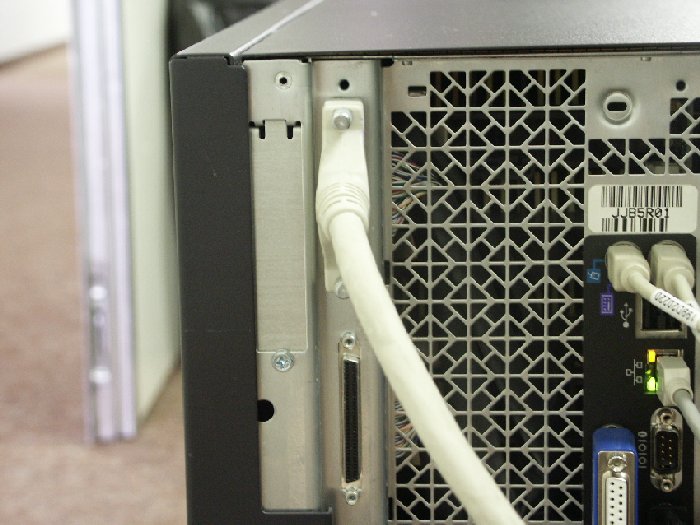
Or, to the SCSI LVD board and connector cable, as shown below. 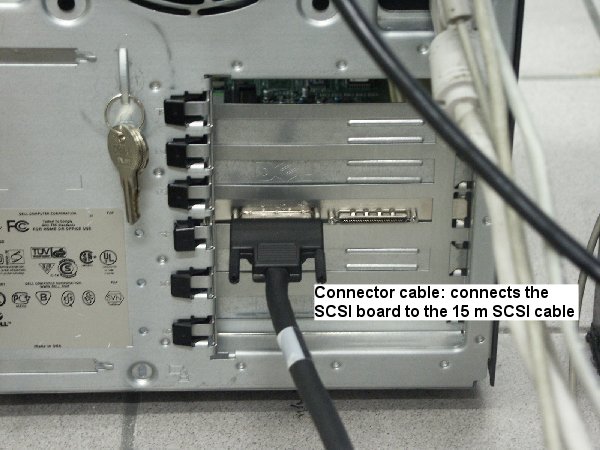
|
||
Test |
|
||
Technical contact(s) |
Content owner: David Weill |
||
Date submitted |
14 Aug 2002 |
||