Home | Contact Us | Submit Troubleshooting Info | Search | Help
Output | Software Solutions | Proofing | Color, Screening and Calibration | Scanning | Digital Photography | Consumables | POS
Home | Contact Us | Submit Troubleshooting Info | Search | Help
Output | Software Solutions | Proofing | Color, Screening and Calibration | Scanning | Digital Photography | Consumables | POS
Product |
CS Xpose 1.00.073 | ||
Platform |
Intel, Dell® 2400 or 6400 |
||
Operating system |
Windows® 2000 |
||
Symptoms |
When logged into a Prinergy® render station as an administrator, an exposefilemap file is created for every output from CS Xpose and is placed in a Temp folder on the Datalog drive (E:). This file is automatically deleted when the plate is done exposing. However, when logged into the render station as an operator, the exposefilemap files do not get deleted, and the E: drive fills up. The operator user is part of the administrators group and appears to have all of the administrative permissions. |
||
Cause |
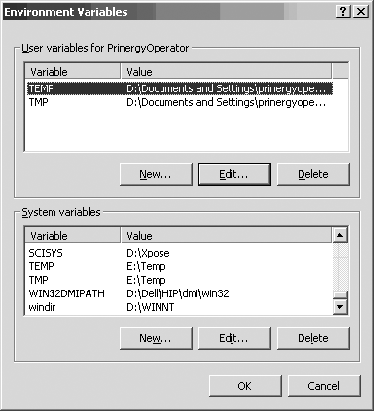
The operator TEMP environment variable is pointing to the wrong location. | ||
Solution |
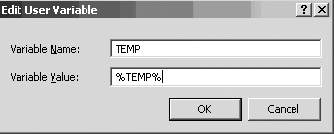
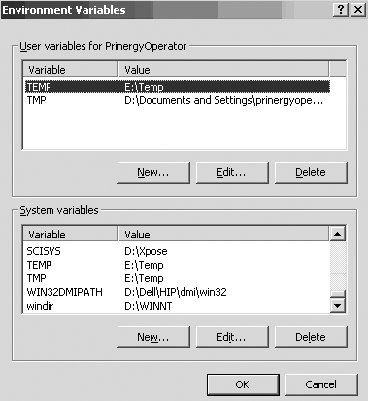
Set the operator TEMP environment variable
as follows:
|
||
Technical contact(s) |
|||
Submitted by |
|||
Date submitted |
21 Mar 2002 |
||