Home | Contact Us | Submit Troubleshooting Info | Search | Help
Output | Software Solutions | Proofing | Color, Screening and Calibration | Scanning | Digital Photography | Consumables | POS
Home | Contact Us | Submit Troubleshooting Info | Search | Help
Output | Software Solutions | Proofing | Color, Screening and Calibration | Scanning | Digital Photography | Consumables | POS
Product |
|
||
Operating system |
Microsoft® Windows® 2000/2003 Server |
||
Symptoms |
Xpo configuration fails because of SCSI problems. |
||
Cause |
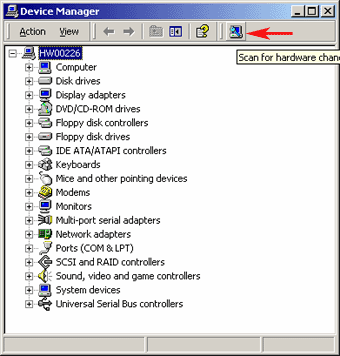
This problem is probably caused because the Prinergy workstation lost the SCSI after restart. To confirm that this is the cause, right-click My Computer and select Properties > Hardware > Device Manager. In the Device Manager window, the SCSI printer is not listed. |
||
Solution |
To solve the problem:
|
||
Technical contact(s) |
|||
Submitted by |
|||
Date submitted |
21 Feb 2006 |
||