Home | Contact Us | Submit Troubleshooting Info | Search | Help
Output | Software Solutions | Proofing | Color, Screening and Calibration | Scanning | Digital Photography | Consumables | POS
Home | Contact Us | Submit Troubleshooting Info | Search | Help
Output | Software Solutions | Proofing | Color, Screening and Calibration | Scanning | Digital Photography | Consumables | POS
Product |
|
|||||
Platform |
Dell GX270, GX280 workstations |
|||||
Operating system |
Microsoft Windows 2000 Server |
|||||
Symptoms |
New plate sets do not appear in the Media list under the Media tab of the ThermoFlex TIFF FE template. |
|||||
Cause |
The ThermoFlex TIFF FE software does not automatically read the new plate sets from the ThermoFlex controller workstation. |
|||||
Solution |
On ThermoFlex Mid/Mid II/Narrow platesetters:
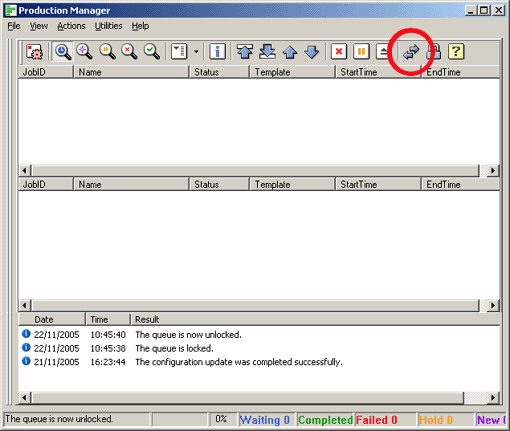
The ThermoFlex TIFF FE software reads the new plate set and updates the Media list. On ThermoFlex Mid/Mid II/Narrow Hybrid platesetters: After performing step 3 (above), you need to stop and start the engine. In the Production Manager:
|
|||||
Technical contact(s) |
||||||
Submitted by |
||||||
Date submitted |
08 Mar 2005 |
|||||