Home | Contact Us | Submit Troubleshooting Info | Search | Help
Output | Software Solutions | Proofing | Color, Screening and Calibration | Scanning | Digital Photography | Consumables | POS
Home | Contact Us | Submit Troubleshooting Info | Search | Help
Output | Software Solutions | Proofing | Color, Screening and Calibration | Scanning | Digital Photography | Consumables | POS
Product |
|
||
Platform |
Intel |
||
Operating system |
Windows 2000, AIX |
||
Error |
|
||
Symptoms |
Every minute Print Console displays and logs an error that the SCSI link is broken or currently unavailable when in fact there is no problem with the configuration. |
||
Cause |
In Print Console 2.1.x and later, there is a polling function that looks for the SCSI connection to Print Console and reports it in the Messages window. Normally this is not a problem, but it can be misleading in a Direct workflow where the SCSI link is connected directly to the Brisque or Prinergy workflow. In this case, Print Console is persistently giving an error when there is nothing wrong. |
||
Solution |
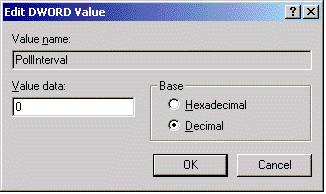
The solution is to turn off the polling function. (This does not stop the reporting of legitimate SCSI errors.)
| ||
Technical contact(s) |
|||
Submitted by |
|||
Date submitted |
11 Oct 2001 |
||