Home | Contact Us | Submit Troubleshooting Info | Search | Help
Output | Software Solutions | Proofing | Color, Screening and Calibration | Scanning | Digital Photography | Consumables | POS
Home | Contact Us | Submit Troubleshooting Info | Search | Help
Output | Software Solutions | Proofing | Color, Screening and Calibration | Scanning | Digital Photography | Consumables | POS
|
|
|||
Product |
|
||
Operating system |
Windows 2000 workstation |
||
|
|
|||
Symptoms |
Plate throughput is slow—workstation is
taking long to process TIFF files from the RIP.
This is most evident in the NEWS 150 and NEWS 200 devices. |
||
|
|
|||
Cause |
If Print Console is not set up correctly, the workstation becomes the limiting factor in the number of plates produced in an hour. Basically the workstation is doing more than is necessary. |
||
|
|
|||
Solution |
Use a set of rotation and mirroring
settings that minimize the amount of needless flipping and rotating
that the workstation has to perform. Below are recommendations on how
to set up Print Console and the Harlequin RIP for optimum plate
throughput:
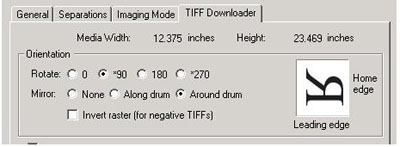
Print Console - In the Print Setups > TIFF Downloader tab, set
for either 90 or 270 degrees rotation around the drum. 90 and 270
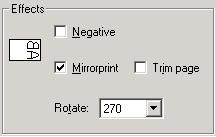
degree rotation is performed by the device and not the workstation. Harlequin RIP - In the Effects window, enable Mirrorprint
and set the rotation to 270 degrees. |
||
|
|
|||
Technical contact(s) |
José Delgado for Print Console |
||
Submitted by |
|||
Date submitted |
24 Oct, 2002 |
||