Home | Contact Us | Submit Troubleshooting Info | Search | Help
Output | Software Solutions | Proofing | Color, Screening and Calibration | Scanning | Digital Photography | Consumables | POS
Home | Contact Us | Submit Troubleshooting Info | Search | Help
Output | Software Solutions | Proofing | Color, Screening and Calibration | Scanning | Digital Photography | Consumables | POS
|
|
|||
Product |
|
||
Operating system |
|
||
|
|
|||
Symptoms |
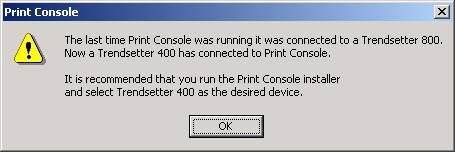
The Trendsetter 800 is installed when upgrading
to Print Console version 3.3 from versions 3.x. When you run Print
Console after the upgrade, the following error message appears:
|
||
|
|
|||
Cause |
Because the Trendsetter 800 and Trendsetter 400 devices had the same installer code in earlier version of Print Console, the installer automatically selects the Trendsetter 800 output device during the upgrade to version 3.3. |
||
|
|
|||
Solution |
Print Console will now be loaded with the correct device and images to operate on a Trendsetter 400 output device. |
||
|
|
|||
Technical contact(s) |
|||
Submitted by |
|||
Date submitted |
Jan 15, 2003 |
||