Home | Contact Us | Submit Troubleshooting Info | Search | Help
Output | Software Solutions | Proofing | Color, Screening and Calibration | Scanning | Digital Photography | Consumables | POS
Home | Contact Us | Submit Troubleshooting Info | Search | Help
Output | Software Solutions | Proofing | Color, Screening and Calibration | Scanning | Digital Photography | Consumables | POS
Machines affected |
|
|||||
Component |
Hotlink cable
|
|||||
Error |
An incorrect bend in the hotlink cable can cause plot errors on Trendsetter VLF devices. |
|||||
Symptoms |
No plotting on plate. No error messages. |
|||||
Cause |
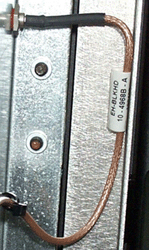
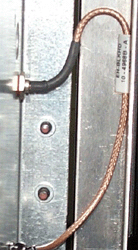
Where the bulkhead-end of the connector is bolted to the wall of the card cage, the hotlink cable has to be bent 90 degrees. In some cases, it is bent too far, which causes the signal to be interrupted. Refer to the examples below:
|
|||||
Solution |
As part of troubleshooting, first try replacing the hotlink cable. Do this before you try replacing the backplane. When replacing the hotlink cable, make sure that the replacement cable is correctly bent, as shown above. |
|||||
Technical contact(s) |
||||||
Submitted by |
||||||
Date submitted |
31 Jan 2003 |
|||||