Home | Contact Us | Submit Troubleshooting Info | Search | Help
Output | Software Solutions | Proofing | Color, Screening and Calibration | Scanning | Digital Photography | Consumables | POS
Home | Contact Us | Submit Troubleshooting Info | Search | Help
Output | Software Solutions | Proofing | Color, Screening and Calibration | Scanning | Digital Photography | Consumables | POS
When to run this script | Graphs | Data | Interpretation
This script executes the firmware command bbs balance and displays the beam profile in graphical format. The output of this script helps to show how much margin is left for future aging of the write laser and light valve.
Use this script to diagnose beam balance failures, banding and as part of preventative maintenance.
Note: Use bbsprofile.spt to diagnose stuck pixels.
Before interpreting the data:
hvtrim setting.beamposition setting.maximumerror, beamslope, beamcurve and scorr settings are set correctly.There should be a lot of buffer space between the minimum laser profile (full attenuation) and the balanced beam. This allows for aging of the laser and light valve.
hvtrim and beamposition has been optimized.| Name | Description |
| BeamBalMaximum | This graph shows the unattenuated write laser profile. |
| BeamBalMinimum | This graph shows the fully attenuated write laser profile. |
| BeamBalMeasured | This graph shows the write laser profile measured by the BBS when the beam is balanced. This balanced profile will not always be a flat line. It is the profile adjusted by the slope and curve settings. |
| Stroke | This graph shows the stroke table used to obtain the results shown in BeamBalMeasured.ps. |
| Ratio | This graph shows the ratio of BeamBalMinimum.ps over BeamBalMaximum.ps. |
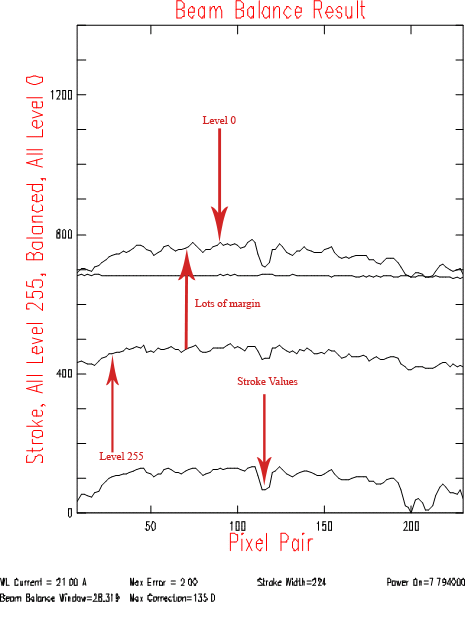
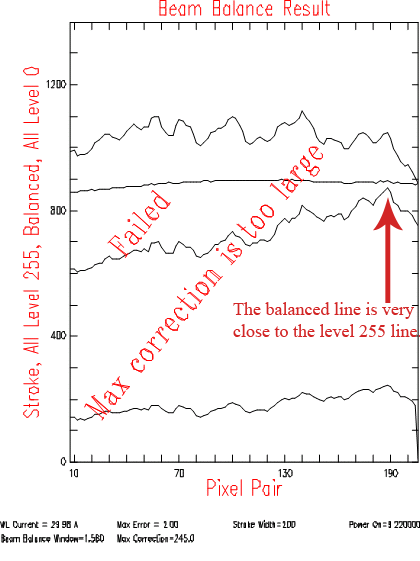
| BeamBalResult | This graph shows a summary of the data obtained
during the beam balance. The elements of the graph are:
|