Home | Contact Us | Submit Troubleshooting Info | Search | Help


    Output | Software Solutions | Proofing | Color, Screening and Calibration | Scanning | Digital Photography | Consumables | POS


Random Intermittent Subscan Image Shift


Product


Trendsetter-based devices


Symptoms


The image is randomly and intermittently shifted in the subscan direction by 4 to 6 mm. This symptom has so far only been observed on the image plotted by the slave head. It is not yet known if it could occur on the image plotted by the master head, but it is a possibility.

On a dual broadsheet plate imaged by the slave head, the entire image is shifted toward the home side or the away side of the plate. On a panorama plate, this symptom would look like an intermittent stitching problem.


Cause


Random, intermittent subscan shifts of 4-6 mm may be caused by faulty wires in the control cables between the Dual Head interface board and the Master or Slave MCE board. These faulty wires can generate noise that causes the slave head to start plotting a fraction of a second sooner or later than it should, thus shifting the image in the subscan direction.


Solution


Parts Required

  • 10-5009B: Slave MCE—Dual Head Interface Cable
  • 10-5010B: Master MCE—Dual Head Interface Cable

Procedure

  1. Shut down the output device.
  2. Open the power box door.
  3. Put on an antistatic wrist strap and plug it into a grounding point on the device frame.
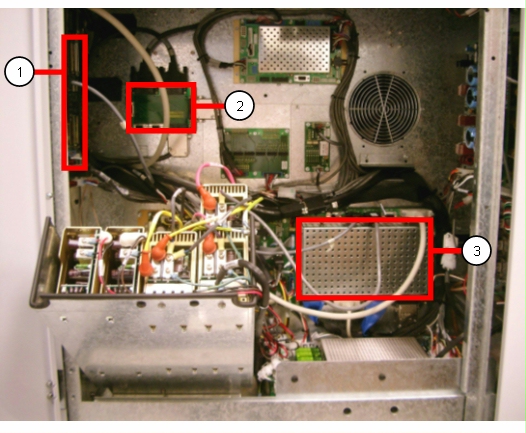
  4. Locate the dual head interface board, master MCE board, and slave MCE board.

      Slave MCE board
      Dual head interface board
      Master MCE board
       
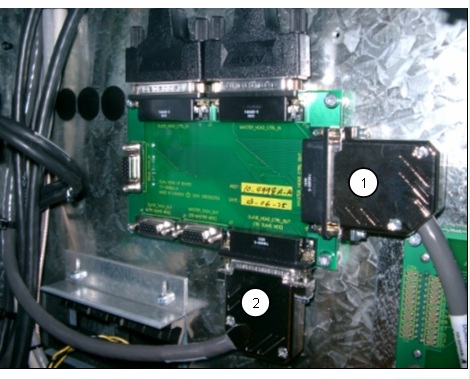
  5. Disconnect both the master head control cable and the slave head control cable from dual head interface board.

      Master head control cable—to master MCE board
      Slave head control cable—to slave MCE board
       
    Note:
    The master head and slave head control cables shown above are no longer in production. The replacement cables use plastic housings instead of metal, and attach with thumb screws instead of jack screws. The new cables are easier to install, and far less likely to have problems with faulty internal wires.
       
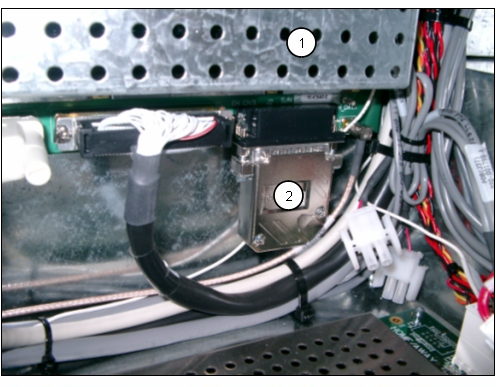
  6. Disconnect the other end of the master head control cable from the connector on the bottom of the master MCE board.

      Master MCE board 
      Master head control cable—to dual head interface board 
       
    Note:
    The master head control cable shown above is no longer in production. It is secured to the master MCE board with jack screws, and is difficult to remove. The cable exit is at 45 degrees out of the backshell, which reduces access to the right screw.
       
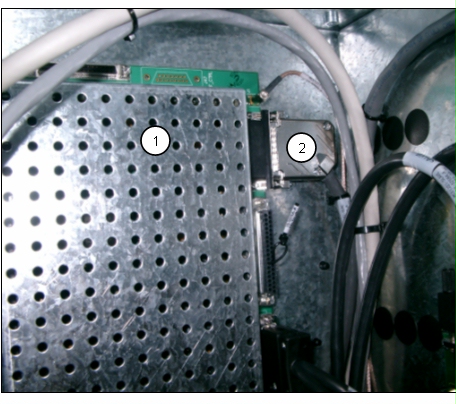
  7. Disconnect the other end of the slave head control cable from the connector on the right side of the slave MCE board.

      Slave MCE board 
      Slave head control cable—to dual head interface board 
       
  8. Connect a replacement master head control cable (10-5010B) between the dual head interface board and the master MCE board.
  9. Connect a replacement slave head control cable (10-5009B) between the dual head interface board and the slave MCE board.
  10. Close all open doors and power up the TSC News device.
  11. Image a few plates to ensure that the intermittent subscan shift problem is solved.

Date submitted
 

19 Dec 2005


    Copyright © 2005 Creo Inc. All rights reserved. Confidential. Back to top.