

Home | Contact Us | Submit Troubleshooting Info | Search | Help
Output | Software Solutions | Proofing | Color, Screening and Calibration | Scanning | Digital Photography | Consumables | POS
Home | Contact Us | Submit Troubleshooting Info | Search | Help
Output | Software Solutions | Proofing | Color, Screening and Calibration | Scanning | Digital Photography | Consumables | POS
Two-position keyswitch | Three-position keyswitch | Keys
The safety interlock override (SIO) keyswitch is for use by authorized Creo service personnel when performing procedures that require deliberate override of the safety interlock circuit.
Never leave the machine unattended with the SIO keyswitch in any Override position. Remember that remote service is able to activate certain mechanical hazards (such as the carriage, drum, etc) without warning when the interlocked panels are open and the keyswitch is in the Override position.
MCE devices have a keyswitch with 2 positions: Normal Operation and Interlock Override.
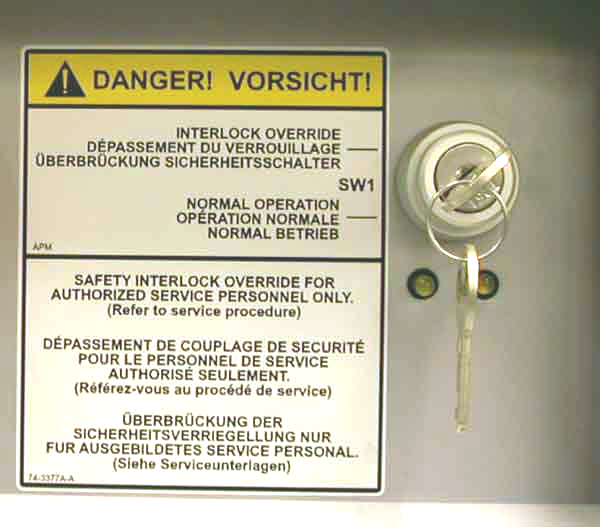 |
2-position SIO keyswitch in normal position
(click to enlarge) |
The key is removable. The safety interlock circuitry is not overridden and the machine can image.
The key is not removable. The safety interlock circuitry is partially overridden. Power is restored to mechanical functions, the TH1.7 focus laser, and the media flyoff detector laser emitter/sensor.
Note: The Interlock Override position will not override the TH2.0 focus laser, which is a hazard for up to 1.2 meters from the aperture of the head. It will also not override the write laser on any thermal head.
In the Interlock Override position, the two LEDs will flash continuously. The device cannot image until power is restored to the write laser, and that will only occur when the key in the SIO keyswitch is returned to the Normal position.
MPE devices have a keyswitch with 3 positions: Normal Operation, Mechanical Hazards, and Laser Hazards.
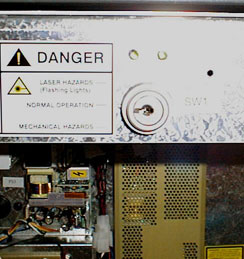 |
3-position SIO keyswitch in normal position
(click to enlarge) |
The safety interlock circuitry is not overridden and the machine can image.
There are only two service procedures that require the use of the SIO keyswitch in the Laser Hazards position:
There are no other acceptable reasons to put the safety interlock override (SIO) keyswitch into the Laser Hazards position.
If you must use the Laser Hazards position, for your safety and the safety of others near the device, follow the service procedures precisely.
If mechanical activation is required during service, use only the Mechanical Hazards position and the mask door creo command. Do not put the keyswitch into the Laser Hazards position to avoid typing this command.
For more information on the 3-position SIO keyswitch, see Laser Safety Bulletin for Trendsetters.
The key is not provided with the SIO keyswitch. It is issued only to qualified Creo service personnel after proper training.