

Home | Contact Us | Submit Troubleshooting Info | Search | Help
Output | Software Solutions | Proofing | Color, Screening and Calibration | Scanning | Digital Photography | Consumables | POS
Home | Contact Us | Submit Troubleshooting Info | Search | Help
Output | Software Solutions | Proofing | Color, Screening and Calibration | Scanning | Digital Photography | Consumables | POS
Throughout this section of the TIC, AppleTalk refers only to AppleTalk Phase 2.
Sub-network refers to the third layer of the seven layered communication stack
sub network. This Sub Network can be segmented by a Switching Hub or Bridge (layer two
network segmentation).
For example, When a server is connected with FDDI to a switching hub with 16 Ethernet
ports, all 16 Ethernet segments and the FDDI are considered as being one sub network.
The Ripro Server can support AppleTalk on a single or multiple network interface, Ethernet and/or FDDI.
When AppleTalk is configured on a multiple network interface, the Ripro Server acts as a router, and publishes network numbers (physical cable range) and zones on the network.
When only one network interface is configured, the Ripro acts almost like any other AppleTalk device such as a Mac or LaserWriter, etc. However, the Ripro does not fully support dynamic AppleTalk address configuration.
The AppleTalk address contains three numbers:
Net#, Node#, and Socket#.
Net Number can range from 1 to 65534,
Node and Socket numbers may take on a value from 1 to 253.
On the Ripro Server, the AppleTalk Network Numbers (cable range) and the Zones need to be configured. This procedure is described below.
The netconf util on the server is used to configure AppleTalk on the Ripro
server.
Three different configurations are supported:
· A site with an external AppleTalk router.
· A site with no AppleTalk router.
· A site where the Ripro is the AppleTalk router.
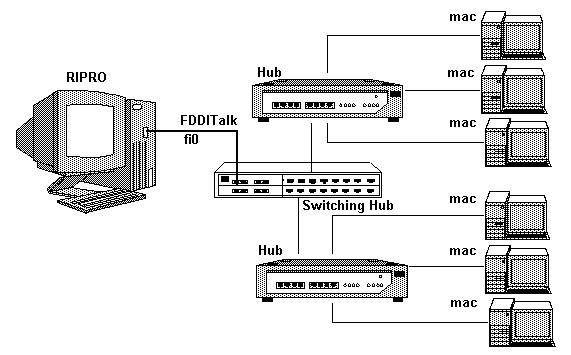
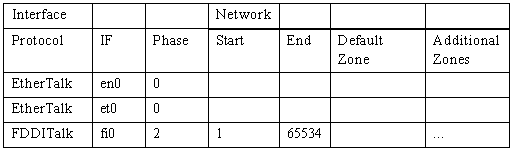
When the Ripro acts as an AppleTalk device (no routing activity), the interface that runs the AppleTalk should be configured like the FDDI in the following example:
_____________________________________________________________
AppleTalk Network Setup, press CTRL-D to end
_____________________________________________________________
The meaning of this setup is:
Note: Since the Ripro is not a router, the Ripro cannot publish zone names on the network. Configuring zone names in this case is illegal and will cause problems on the network.
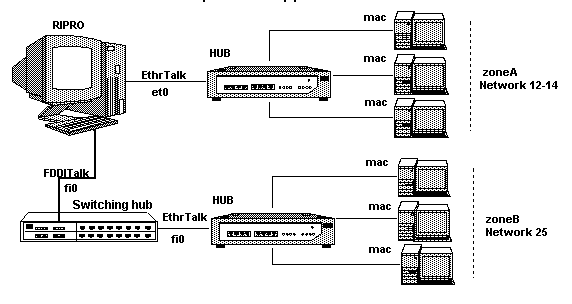
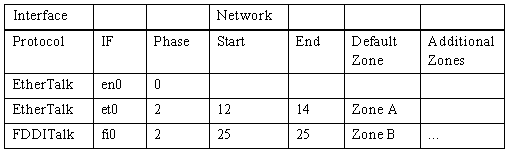
The Ripro acts as an AppleTalk router when more than one network interface is configured to run AppleTalk.
The netconf screen should be, for example, as follows:
_____________________________________________________________
AppleTalk Network Setup, press CTRL-D to end
_____________________________________________________________
The meaning of this setup is:
Note: Do not connect two interfaces of a Router to the devices that bridge them.
For example: configuring AppleTalk on two Ripro interfaces that are connected to the same switching Hub is not allowed and will cause severe problems on the network (i.e. devices jumping from one zone to the other, lost connections, etc.).
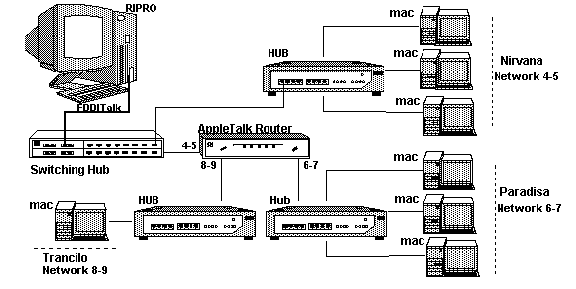
If the Ripro is connected to a network with an external router, the Ripro should be configured according to the configuration of the external router.
For example, an external router has 2 interfaces and the Ripro is connected to
interface 1 of the router. The external router was configured to publish the following
network information on interface 1:
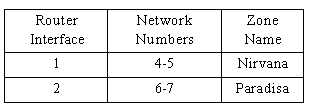
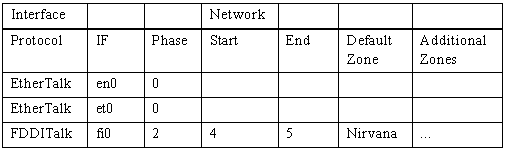
The Ripro configuration should then look as follows (assuming that the Ripro is connected via FDDI):
_____________________________________________________________
AppleTalk Network Setup, press CTRL-D to end
_____________________________________________________________
The meaning of this set up is:
The Network Number is set for each interface that is running AppleTalk according to the netconf configuration. The Ripro tries to use the Network Start number.
The Node number is set as follows (assuming that the Network Numbers are 1 2):
The Ripro will try to use 140 as the node number. If any other station already uses this
address, the Ripro will try 141 as the node number and so on, until it finds a free node
number on this Sub Network. If all the nodes from 1.140 (Net #.Node #) to 1.253 are in
use, the Ripro will try 2.140 and higher (there are almost no chances that this will
happen even in a network with a lot of Macs).
The Mac configures the network and node numbers dynamically. First, it will try to use the same address it had the last time it was connected to the network. If this address is taken, or the network configuration was changed and the address does not fit the new configuration, the Mac will pick another address (pseudo-dynamically).