Home | Contact Us | Submit Troubleshooting Info | Search | Help
Output | Software Solutions | Proofing | Color, Screening and Calibration | Scanning | Digital Photography | Consumables | POS
Home | Contact Us | Submit Troubleshooting Info | Search | Help
Output | Software Solutions | Proofing | Color, Screening and Calibration | Scanning | Digital Photography | Consumables | POS
AppleTalk Configuration on Ripro Server
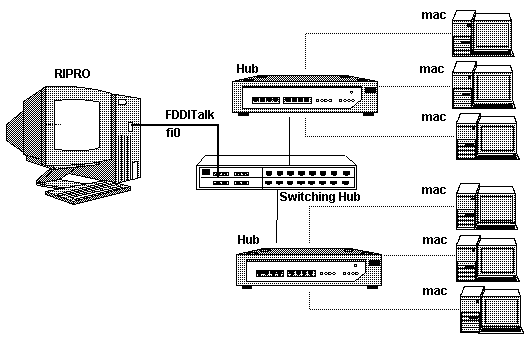
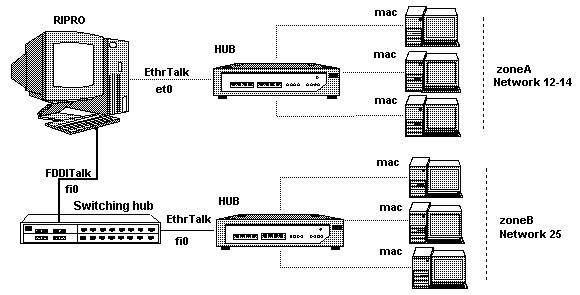
IntroductionThe Ripro Server can support AppleTalk on a single or multiple network interface (Ethernet and/or FDDI).
Throughout this document, AppleTalk
refers only to AppleTalk Phase 2. For example: The AppleTalk address contains three numbers Net#.Node#.Socket#. Net Number can range from 1 to 65534, Node and Socket numbers may take on a value from 1 to 253 (see the glossary for more details). On the Ripro Server, the AppleTalk Network Numbers (cable range) and the Zones, need to be configured. This procedure is described below. How to
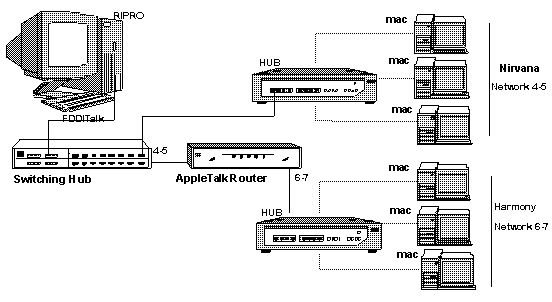
configure Ripro Server AppleTalk
|
| Router Interface | Network Numbers | Zone Name |
| 1 | 4-5 | Nirvana |
| 2 | 6-7 | Harmony |
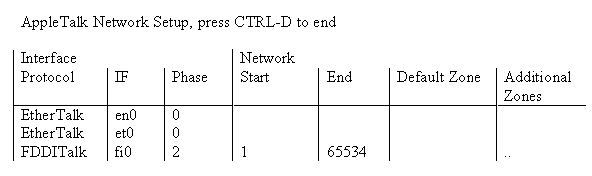
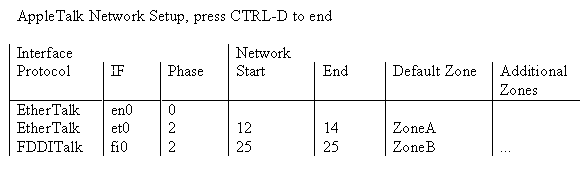
The Ripro
configuration should then look as follows (assuming that
the Ripro is connected via FDDI):
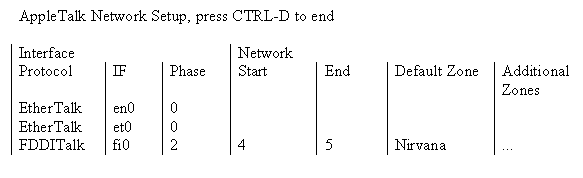
This meaning of this set up is:
The Network Number is set for each interface that is running AppleTalk according to the netconf configuration. The Ripro tries to use the Network Start number.
The Node number is set as follow
(assuming that the Network Numbers are 1-2):
The Ripro will try to use 140 as the node number. If any
other station already uses this address, the Ripro will
try 141 as the node number and so on, until it finds a
free node number on this Sub Network. If all the nodes
from 1.140 (Net #.Node #) to 1.253 are in use, the Ripro
will try 2.140 and higher (there are almost no chances
that this will happen even in a network with a lot of
Macs).
The Mac configures the network and node numbers dynamically. First, it will try to use the same address it had the last time it was connected to the network. If this address is taken, or the network configuration was changed and the address does not fit the new configuration, the Mac will pick another address (pseudo-dynamically).
AppleTalk Router
A Router is a device that moves some kind of network traffic between two or more Sub Networks. It does this by looking at a AppleTalk destination address (layer three adress) in the traffic off of the first network, and copying the traffic to whichever network gets the traffic closer to the network that the address in the traffic indicates is the destination. Depending on the type of Router, the address could be one of many different protocols, such as AppleTalk, IP, or DECnet.
Bridge
A bridge is a device that moves some kind of network traffic between two or more segments. It does this by looking at a physical destination address (layer two address) in the traffic off of the first segment, and copying the traffic to whichever segment gets the traffic closer to the segment that the address in the traffic indicates is the destination. Bridges suppose to compliance to IEEE 802.1d (the IEEE standard that defined how bridges should work)
Network Numbers
Each AppleTalk Sub Network needs a unique 16-bit network number. The Network Number ensures that traffic from one Sub Network can be distinguished from traffic on another Sub Network when the two are connected with a Router. In particular if a network wishes to be on the campus-wide AppleTalk, the numbers must be unique across campus.
A Sub Network can support multiple zones, theoretically up to 255. Two examples of extended networks, and how their numbering works are:
LocalTalk -- All LocalTalk Sub Networks have a single Network Number, which can theoretically support up to 254 nodes. In reality, 254 is way too many nodes for a LocalTalk network.
EtherTalk Phase 2 -- Phase 2 uses a range of Network Numbers, each of which can support up to 253 nodes. EtherTalk Phase 2 is commonly just called EtherTalk.
Node
A number between 1 and 253. It is unique for a device on a physical network. This number is determined by the device at its boot time, and it keeps that number (at least) until it is powered off or restarted. Node numbers 1-127 are "client" numbers (i.e.: regular Macintoshes), and numbers 128 - 253 are "server" numbers (i.e.: printers and AppleShare file servers).
Socket
A socket is a logical entity in a node connected to an AppleTalk network. A socket is owned by software that can send and receive data through the socket. There can be 254 different sockets on a node, and various sockets are reserved for different things.
Switch
Switch can be relate as an high speed multiport bridge. Some switches are fully compliance to the 802,1d standard, others are implementing proprietary mechanism in order to improve performance.
(The LP2500, LS2200 and LP6000 in there default configuration are compliance to the 802.1d standard - When a Switch is being use in SciNet environment it should compliance to the 802.1d standards otherwise it can cause "no communication" problems).
Zone -- Also Zones, or Zone Name
A zone is basically a text name
that represents some parts or all of a network. Zones
make it easy to find groups of devices in the Chooser. A
zone can consist of only one Sub Network, or it can group
together several Network Numbers into a single
"logical" network. This allows devices on
EtherTalk and LocalTalk Sub Networks to be seen together
in the Chooser under one zone name. Thus allowing all
departmental servers and printers to be found in one
place, even if they have more than one Sub Network. It is
also possible to have a list of zone names that are all
used by a single extended network. Any zones in that list
could also be used on other Sub Networks. Here are some
examples of the use of zone names on networks:
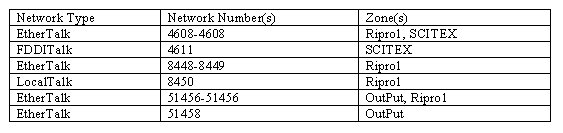
Any machine on the Sub Network 4608-4608 could choose between zones Ripro1 and SCITEX, while a machine on 4611 would have to be in SCITEX. A machine on 8448-8449 or 8450 would have to be in Ripro1, while a machine on 51456-51456 could choose from Ripro1 or OutPut. Any machine on 51458 would have to be in OutPut. So while only three zones would show up in the chooser, there would actually be 6 networks that were connected and accessible.