Ripro Server Networking
Setting
TCP/IP Parameters
Networks allow for several user and
application communications functions. They enable the
user to:
- Send electronic mail.
- Emulate another terminal or
log in to another computer.
- Transfer data.
- Execute programs residing on a
remote node.
- Access remote file systems
(NFS, AppleShare etc).
TCP/IP is a communications system
that allows you to set up local area and wide area
networks. TCP/IP allows you to transfer files between
systems, log in to remote systems, run commands on and
print files to remote systems, and communicate
interactively or through mail with remote users. TCP/IP
provides basic network management capability.
The IP address is built out of 4
numbers each separated by dot. Each number can range
between 0 and 255 (i.e. the range of an IP address can be
between 0.0.0.0 to 255.255.255.255).
Usually Ethernet networks are
divided into subnets, each subnet has a Subnet Mask that
defines the range of addresses that each host on this
subnet can be allocated.
On each network segment up to 254
hosts can be connected (0 is used as a gateway address
and 255 as a broadcast address).
The following is the recommended
structure for Scitex IP addresses:
| Station/Unit |
Recommended Address |
First
Ethernet Communication board
(ent0) on Ripro Server (Ripro1) |
192.9.100.X
(X is 1-20) |
Second
Ethernet Communication board
(ent1) on Ripro Server (Ripro1) |
192.9.110.X
(X is 1-20) |
Third
Ethernet Communication board
(ent2) on Ripro Server (Ripro1) |
192.9.120.X
(X is 1-20) |
Fourth
Ethernet Communication board
(ent3) on Ripro Server (Ripro1) |
192.9.130.X
(X is 1-20) |
| FDDI
Adapter (fi0) on Ripro Server |
192.9.150.X
(X is 1-20) |
| Mac |
192.9.Y.[21-74] |
| PS/2 |
192.9.Y.[75-99] |
| Sun |
192.9.Y.[100-119] |
| Whisper
|
192.9.Y.[120-149] |
Communication
units
(hubs, routers, switching hubs etc.) |
192.9.Y.[200-254] |
Examples
- Y-is determined by
the Network communication board on the particular
server. 192.9.110.25- is a Mac connected to the
Second Ethernet board on Ripro1.
- 192.9.150.125- is a
Whisper connected to FDDI through the Switching
Hub.
- The first Mac
connected to ent0 will have an address of
192.9.100.21.
- The first PS/2*
connected to the Ripro Server via the FDDI
adapter and Switching Hub will have an IP address
of 192.9.150.75.
- The first Whisper
connected to ent1 will have an address of
192.9.110.120
The Network File System (NFS) is a
distributed file system that allows the UNIX host (or
other NFS clients) to access files, directories and
peripherals of another remote station (that supports an
NFS server) as if they were local.
SciNet is a Scitex proprietary
communication protocol used for the connectivity of the
following platforms, Whisper, Mac, PS/2 and the Ripro
Server over proprietary LAN adapters (LANC, SciNet and
FDDI) above Ethernet and FDDI.
The following procedure describes
the configuration of communication and networking.
- Activate the SMIT utility by
typing: smit
tcpip
and press Enter. The
TCP/IP Minimum Configuration & Startup screen
appears, with Minimum Configuration &
Startup highlighted.
- Press Enter to produce the
Available Network Interfaces list: The following
screen appears:
Available
Network Interfaces
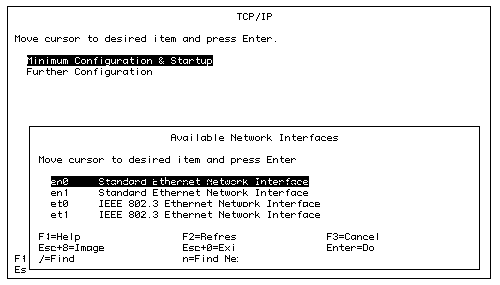
- Select the network interface
to configure, press Enter (e.g. to configure the
first board in a machine with two boards
installed, you need to configure en0, et0) and
use the Minimum Configuration & Startup
screen to enter the configuration values.
Note: The 41T model
comes with only 1 communication board, therefore you can
configure only en0 and et0.
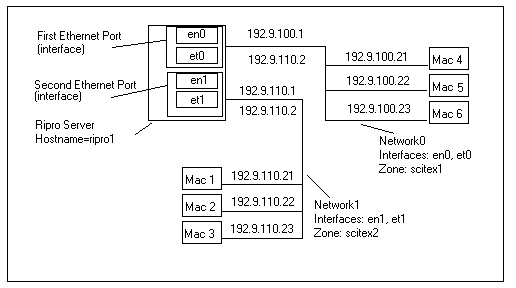
Network
Example
Minimum
Configuration & Startup
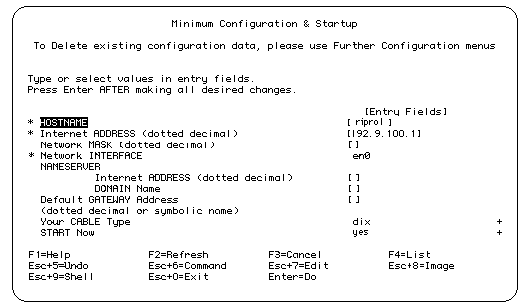
- From the network example,
enter the hostname as ripro1, this name was
decided during the New Station Configuration.
- For sites where a configured
TCP/IP network already exists (with or without
routers), the site network administrator should
provide the following network address parameters
for each Ripro interface: IP Address, Network
Mask and Default Gateway Address.
- An empty Network Mask entry
field indicates that the default Network Mask is
being used. the Ripro default IP Addresses belong
to Class C whose default address is
255.255.255.0.
- Network Interface will display
the interface being configured (en0 in the
example).
- If your Cable Type is not bnc
(default), select this item and press TAB to
change to dix.
For built-in Ethernet ports on models 34H, 41T
and 55L this is not applicable.
- Similarly select Start Now and
press TAB to change from "no" to
"yes".
- Press Enter after making all
changes.
- Press [F3] twice to return to
the TCP/IP menu. 12. Repeat steps 3-10 to
configure the other interfaces installed on your
system (e.g. en1, et1).
Note: Ensure that you choose
the correct cable type bnc/dix. (Dix is for connecting
your transceiver to the AUI connector).
TYPICAL
SET OF NETWORK INTERFACES AND IP ADDRESSES
|
| Network
Interface |
Internet
Address(IP address) |
Communication
Board |
| en0 |
192.9.100.1 |
Standard EtherNet Board 0 (ent0) |
| et0 |
192.9.100.2 |
|
| |
|
|
| en1 |
192.9.110.1 |
Standard EtherNet Board 1 (ent1) |
| et1 |
192.9.110.2 |
|
| |
|
|
| en2 |
192.9.120.1 |
Standard EtherNet Board 2 (ent2) |
| et2 |
192.9.120.2 |
|
Note: If
there are other UNIX systems on-site, the Network
Administrator will issue you the appropriate IP numbers.
- Press [F10] to exit SMIT after
all interfaces have been configured.
- To verify your TCP/IP
installation: type ping and the station name at
the command prompt, you should receive a
continuous reply with TCP/IP details.
|

