Workflows
OPI - Open
Printing Interface
All user actions on the lo-res
files are marked by OPI comments and inserted in the
final PostScript print job.
The OPI server interprets the OPI
comments, searches for the hi-res originals, substitutes
them instead of the lo-res layouts and applies all the
appropriate image processing (mask,etc).
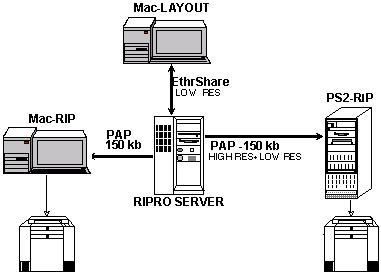
OPI Features
- Automatic or programmed
creation of layout files
- TIFF , EPS, DCS files
- Runs over Ethernet or FDDI
- Uses low performance protocol
- PAP - (150kb).
OPI Workflow
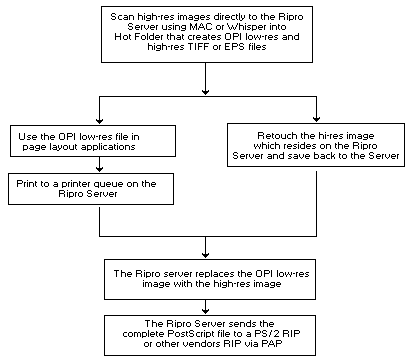
OPI Product
Highlights
- The EtherShare - file server
automatically informs the OPI server about events
in its volumes and directories so that proper
actions can be taken (create low res or replace
low res with high res).
- The low to high res
replacement is performed on Ripro.
- The whole picture is
trasnfered to Ps2 using PAP (150 kb)
APR (Automatic Picture
Replacement)
Like OPI, APR uses a low-res file
called PSlmage, and creates an image of any file type.
The low-res file is used for positioning and manipulation
with a DTP page layout application. The low-res file is
replaced automatically with the high-res file shortly
before exposure.
The replacement is performed by the
Scitex output device (for example, Dolev PS). It takes
the high-resolution files from folders it recognizes as APR
Path which resides on the server. Unlike the OPI, the
high-res copy replacement is performed through a high
performance protocol called NFS (not PAP - Print Access
Protocol, which is used for printing in the Mac
environment).
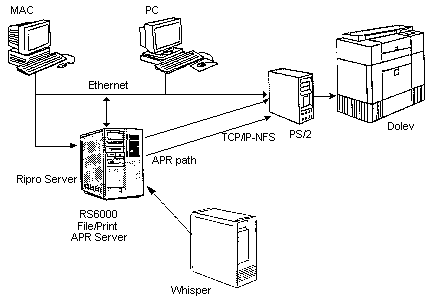
APR Workflow:
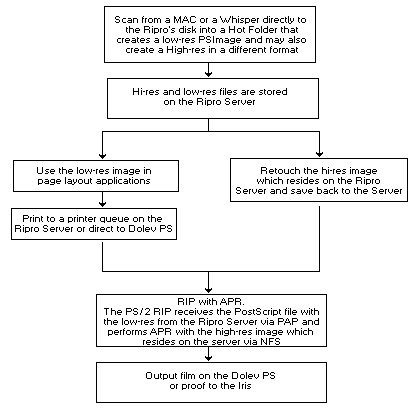
Use the Ripro Server to store high
resolution files for both API and OPI workflows.
Macintosh
Scans, Color Correction, Page Assembling, and Plotting to
the Dolev - Using APR
- Mac scans are directly placed
into a Hot Folder on the Ripro Server. The Hot
Folder automatically creates the PSImages
(low-res files) and then places them into a
predefined destination folder.
- Retouching/color correction is
performed on the Macintosh which opens the
high-res files from the Ripro Server.
- Page assembling is implemented
on the Macintosh using the low-res files which
are loaded from the Hot Folder's low-res
destination folder. After page layout is
complete, the pages are printed to the Dolev PS
via a print spooler on the Ripro Server or
direct.
- The Dolev performs APR by
replacing the low-res files with the high-res
files located on the Ripro Server in the Hot
Folder's high-res destination folder (which is in
the APR path). The Dolev then plots (or proofs)
the pages.
Macintosh
Scans, Whisper Retouching, Page Assembling, Plotting to
the Dolev
- Macintosh scans are directly
placed into a Hot Folder on the Ripro Server.
PSimages are automatically created and the
high-res files are translated to Whisper format
(native or handshake).
- Retouching/color correction is
implemented on the Whisper which copies the
high-res files from the Ripro Server. When the
retouching is complete, the Whisper copies the
files on to the Ripro Server's disk. Blaze mode
images can be opened and saved directly to the
Server.
- Page assembling is implemented
on the Macintosh using the low-res files taken
from the Hot Folder's low-res destination folder.
After page layout is complete, the pages are
printed to the Dolev via a print spooler on the
Ripro Server or direct.
- The Dolev performs APR by
replacing the low-res files with the high-res
files located on the Ripro Server in the Hot
Folder's high-res destination folder (which is in
the APR path). The Dolev then plots the pages.
Whisper Scans,
Macintosh Retouching and Page Assembling, Plotting to the
Dolev
- Whisper scans are directly
placed into a Hot Folder on the Ripro Server
where PSImages are created automatically.
- Retouching/color correction is
implemented on the Macintosh which opens the
high-res files from the Ripro Server. When the
retouching is completed, the files are saved, by
the Mac, to the Ripro Server's disk.
- Page assembling is implemented
on the Macintosh using the low-res files taken
from the Hot Folder's low-res destination folder.
After page layout is complete, the pages are
printed to the Dolev via a print spooler on the
Ripro Server or direct.
- The Dolev performs APR by
replacing the low-res files with the high-res
files located on the Ripro Server in the Hot
Folder's high-res destination folder (which is in
the APR path). The Dolev then plots the pages.
Whisper Scans,
Macintosh Retouching and Page Assembling, OPI Imagesetter
Plotting
- Whisper scans are directly
placed into a Hot Folder on the Ripro Server
where OPI low-res images are created
automatically.
- Retouching/color correction is
implemented on the Macintosh which takes the
high-res files from the Ripro Server. When the
retouching is completed, the files are saved, by
the Mac, to the Ripro Server's disk.
- Page assembling is implemented
on the Macintosh using the low-res files, loaded
from the Hot Folder's low-res destination folder.
After page layout is complete, the pages are
printed to an OPI print spooler on the Ripro
Server, that sends the PostScript files
(including the high-res files) to the Dolev PS or
any Postscript imagesetter.
|

