Home | Contact Us | Submit Troubleshooting Info | Search | Help
Output | Software Solutions | Proofing | Color, Screening and Calibration | Scanning | Digital Photography | Consumables | POS
Home | Contact Us | Submit Troubleshooting Info | Search | Help
Output | Software Solutions | Proofing | Color, Screening and Calibration | Scanning | Digital Photography | Consumables | POS
|
|
|||
Question |
I heard that if I have PPP Log enabled it will show me the name of the machine I dialed into. How do I configure my machine to do this? | ||
|
|
|||
Answer |
To activate your PPP Logging in NT you need to go to the registry and do the following: 1. Run Registry Editor (Regedt32.exe). 2.
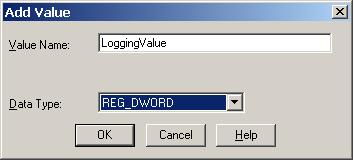
From the HKEY_LOCAL_MACHINE subtree, go to the following key: 3. Select the Logging value. 4. From the Edit menu choose DWORD. 5. Press 1 and choose OK. Figure 10 – Adding the Value Name in the Registry NOTE: A data value of 1 is standard logging, but setting this value to 2 will enable PPP logging in verbose mode. 6. Reboot the Computer. The logging info is then placed %SYSTEMROOT%\SYSTEM32\RAS\PPP.LOG. Make a shortcut to the desktop and every time you connect you can open the PPP Log in Notepad and check where you are. If you are running W2K you need to perform a similar routine: 1. Open the registry editor using Regedt32.exe. 2.
Go to the following key
in the registry: Console or File Tracing is then individually turned on or off for each of the 27 subkeys. So, find the PPP entry and enable it by turning the value from 0 to 1. These subkeys under the Tracing key each have a value for EnableConsoleTracing:REG_DWORD: and EnableFileTracing:REG_DWORD. File tracing will begin as soon as you edit the EnableFileTracing keys; however, to begin console tracing you will need to stop and restart the RRAS service. |
||
|
|
|||
Technical Contact(s) |
|||
Date Submitted |
08 Mar 2002 |
||