Home | Contact Us | Submit Troubleshooting Info | Search | Help
Output | Software Solutions | Proofing | Color, Screening and Calibration | Scanning | Digital Photography | Consumables | POS
Home | Contact Us | Submit Troubleshooting Info | Search | Help
Output | Software Solutions | Proofing | Color, Screening and Calibration | Scanning | Digital Photography | Consumables | POS
|
|
|||
Question |
Is there any other way to do this? This stuff is too convoluted for me | ||
|
|
|||
Answer |
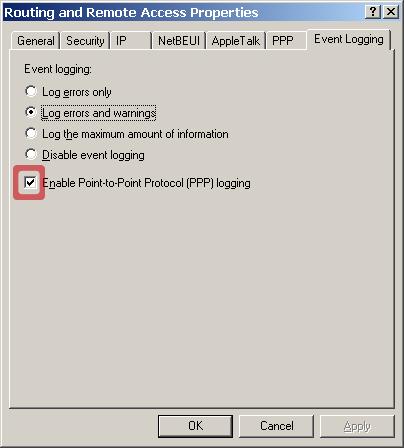
It is possible to do it from the windows GUI but ONLY on W2K Server. To enable PPP logging on W2K Server by using the graphical user interface(GUI): 1. Start the Routing and Remote Access Services (RRAS) tool in Microsoft Management Console (MMC). 2. In the left pane, right-click the RRAS server for which you want to enable logging, and then click Properties. 3. Click the Event Logging tab. Click to select the "Enable Point-to-Point Protocol (PPP) logging" check box. Figure 12 - Routing & Remote Access - Enable PPP Logging |
||
|
|
|||
Technical Contact(s) |
|||
Date Submitted |
08 Mar 2002 |
||