Home | Contact Us | Submit Troubleshooting Info | Search | Help
Output | Software Solutions | Proofing | Color, Screening and Calibration | Scanning | Digital Photography | Consumables | POS
Home | Contact Us | Submit Troubleshooting Info | Search | Help
Output | Software Solutions | Proofing | Color, Screening and Calibration | Scanning | Digital Photography | Consumables | POS
|
|
|||
Question |
This PPP Log is a mess – how do I make anything useful out of it? | ||
|
|
|||
Answer |
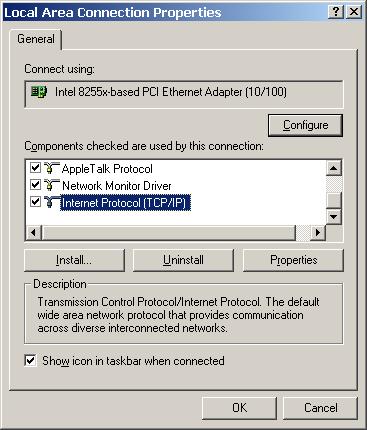
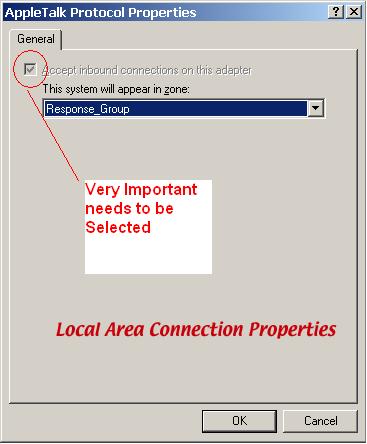
It is a mess but it’s an organized mess. The most important info you can get from there is the name of the machine you just dialed into (the modem host). That will tell you where to map to if you don’t know the name of the server. Scroll down to the bottom of the log and then slowly back up. Watch the right hand side of the text and pay close attention. You should be able to see the name of the server hidden in the general negotiation noise. It kinda looks like this: <snip> <PPP packet sent at 11/12/2001 16:37:59:414 <Protocol = NBFCP, Type = Configure-Ack, Length = 0x1a, Id = 0x4, Port = 8 <80 3F 02 04 00 18 03 05 00 05 01 02 0F 00 01 00 |.?..............| <01 00 00 43 57 31 38 35 33 00 00 00 00 00 00 00 |...CW1853.......| </snip> The stuff before and after that is useless to us. And be careful – if you skip the current connection and go too far up you will end up in the part of the log covering the previous section and end up with a wrong server name. If you open up your Notepad window wide, it will be easier to make sense of the clutter. Figure 13 - Right click My Computer - Select Local Area Connection Figure 14 - Appletalk Protocol RAS Selection |
||
|
|
|||
Technical Contact(s) |
|||
Date Submitted |
08 Mar 2002 |
||