Home | Contact Us | Submit Troubleshooting Info | Search | Help
Output | Software Solutions | Proofing | Color, Screening and Calibration | Scanning | Digital Photography | Consumables | POS
Home | Contact Us | Submit Troubleshooting Info | Search | Help
Output | Software Solutions | Proofing | Color, Screening and Calibration | Scanning | Digital Photography | Consumables | POS
Product |
All ghost versions for both Prinergy® and iMPAct products. |
||
Platform |
All Dell® platforms |
||
Operating system |
Microsoft® Windows® |
||
Symptoms |
After reghosting a Dell system, the drive letter configuration can be unexpected or incorrect, particularly on the newer GX and PowerEdge models. No system or application error appears after ghosting, but Prinergy and other workflow applications will not install or perform correctly with an incorrect drive configuration. Among other symptoms, when viewing drive mapping, drives C, D and E are typically mapped to physical disks that are not standard for Prinergy configurations. |
||
Cause |
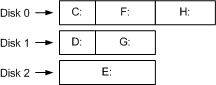
By default, disks that reside on the same bus will be assigned drive letters sequentially, starting from the first partition of the first drive, followed by the first partition of the next drive, and so on. Drive letters are then assigned to the second partitition of each drive in the same way, and continuing until all partitions are assigned drive letters. Drive letters are then assigned to the partitions of disks on the next bus. For example:
|
||
Solution |
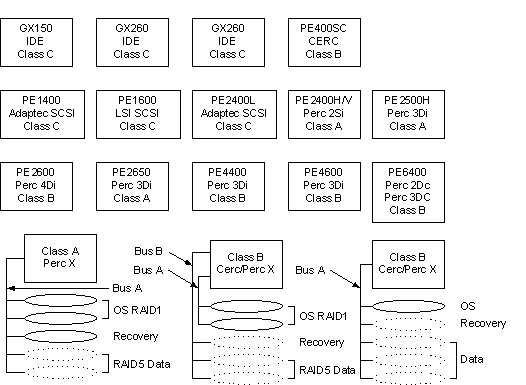
In most cases, drives other then the OS drive must be removed after applying the ghost for the first two restarts, unless the non-OS drive resides on a separate bus. The following illustrates which drives must be removed after applying the ghost:
Class A: All disks must be pulled except for the OS
disks. |
||
Technical contact(s) |
|||
Submitted by |
|||
Date submitted |
26 Jan 2004 |
||