

Home | Contact Us | Submit Troubleshooting Info | Search | Help
Output | Software Solutions | Proofing | Color, Screening and Calibration | Scanning | Digital Photography | Consumables | POS
Home | Contact Us | Submit Troubleshooting Info | Search | Help
Output | Software Solutions | Proofing | Color, Screening and Calibration | Scanning | Digital Photography | Consumables | POS
| Creating a CreoScitex Vignette in Freehand 5.x , 7.0 & 8.0 |
| May 1998 Application Note #15.2 |
When you install Freehand 5.X or 7.0/8.0, a folder named UserPrep is automatically created. For FreeHand 5.x users this folder contains the Scitex.prp file, which in turn contains the CreoScitex Vignette processing instructions.
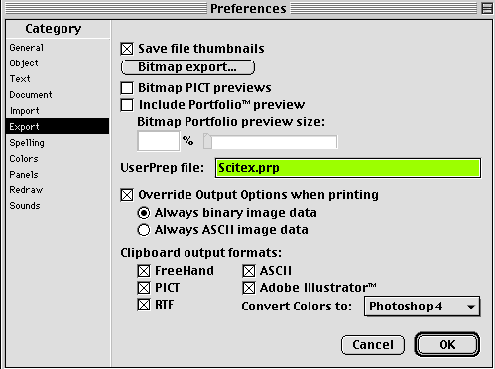
For FreeHand 7.0 & 8.0 users, the file Scitex.prp file should be copied from the utilities folder (Brisque / PS/M) to FreeHandUserPrep folder.
When you RIP the file, these instructions are used to convert the Vignettes into Scitex CTs.
Please note the following:
Limitation:
To activate the CreoScitex Vignette functionality in Freehand 5.0 and 5.5:
To activate the CreoScitex Vignette functionality in Freehand 7.0/8.0
Note: If, during processing, FreeHand cannot locate the UserPrep file, no message is displayed to indicate this, and the file is processed without the CreoScitex Vignette functionality.
For further information, refer to the UserPrep Read me file that is included with Freehand 5.x.
Figure 1 display Freehand 5.x preferences setting.
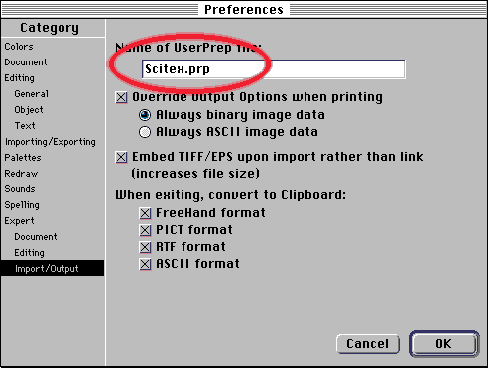
Figure 2 display Freehand 7.0 preferences setting.
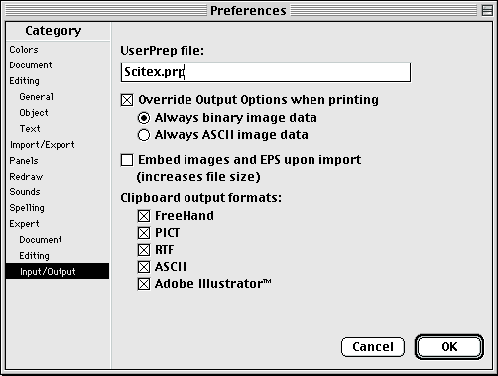
Figure 3 display Freehand 8.0 preferences setting.
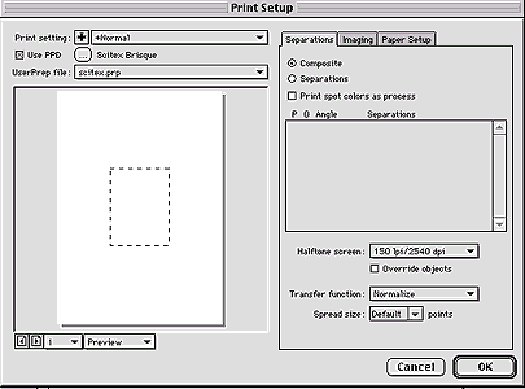
Freehand 7.0 & 8.0 users, in addition to the preferences dialog setting you will also need to select the Scitex.prp file from the print dialog as described in Figure 4.
To select the Scitex.prp file from the UserPrep file filed;
From the main print dialog, enter the > Print Setting > Setup... button to select the scitex.prp from the UserPrep file popup menu.
Figure 4 - selecting the Scitex.prp file form the
UserPrep file filed.
Copyright
(c)1998 Scitex Corporation Ltd. All rights reserved.
CreoScitex, the CreoScitex logo are trademarks of Scitex Corporation Ltd. and/or
its subsidiaries, and may be registered in certain jurisdictions.
Comments or questions? webmaster@www.scitex.com