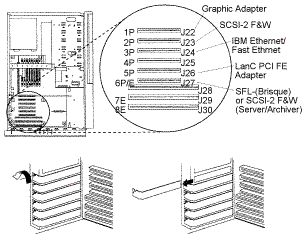
Before installing the board, attach the connecting bracket
to the component side of the board. Refer to: Bracket
Kit.
Shut down the system using appropriate shutdown commands if
necessary. (this will also power off the system)
Disconnect the power cord.
Power off all other attached devices.
To remove the front and side covers, and the I/O Planar
cover, refer to 25F/5 User's Guide, Chapter 5 Installing Options,
Removing both the Front and Side Covers, pages 5-10 to 5-16.
Remove the expansion slot cover from slot 4.
To install the adapter, refer to 25F/5
User's Guide, Chapter 5 Installing Options, Installing Adapters, page 5-33.
Install LanC PCI adapter into slot 4.
Ensure that the adapter is firmly fitted in the slot.
Replace covers and retaining screws; refer to steps 3-5.
Insert the twisted pair cable into the 10BaseT or 100BaseTX
port on the LanC PCI adapter, and connect to the Hub.
Power on all attached devices.
Power on the Brisque or CreoScitex Ripro Archiver
or CreoScitex Ripro Server.
Hardware Installation for 43P
Platform
Before installing the board, attach the connecting bracket
to the component side of the board. Refer to: Bracket
Kit.
Shut down the system using appropriate shutdown commands if
necessary. (this will also power off the system)
Disconnect the power cord.
Power off all other attached devices.
To remove the cover, refer to 43/14
and 43/24 User's Guide, Chapter 4, Installing and Removing Options, page 4-4.
Remove expansion slot cover from slot 4.
Install LanC PCI adapter into slot 4.
Ensure adapter is firmly fitted in slot.
Replace cover; refer to 43/14 and
43/24 User's Guide, Chapter 4, Installing and Removing Options, page 4-105.
Insert the twisted pair cable into the 10BaseT or 100BaseTX
port on the LanC PCI adapter and connect to the Hub.
Power on all attached devices.
Power on the Brisque or CreoScitex Ripro Archiver
or CreoScitex Ripro Server.
Hardware Installation for E-30
Platform
Before installing the board, attach the connecting bracket
to the component side of the board. Refer to: Bracket
Kit.
Shut down the system using appropriate shutdown commands if
necessary. (this will also power off the system)
Power off all other attached devices.
Disconnect the power cord from the back of the
Brisque or CreoScitex Ripro Archiver or CreoScitex Ripro Server.
Remove the cover:
Loosen six retaining screws on the back of the cover.
Grasp cover, pull back slightly, tilt cover backward and
lift off.
Remove expansion board holder.
Remove expansion slot cover from slot 5.
Install LanC PCI adapter into slot 5.
Ensure adapter is firmly fitted in slot.
Replace expansion board holder.
Replace cover and retaining screws.
Connect all cords to back of system.
Insert the twisted pair cable into the 10BaseT or 100BaseTX
port on the LanC PCI adapter and connect to the Hub.
Power on all attached devices.
Power on the system.
Refer to RISC
System/6000 7024 E Series Service Guide for more information on procedures described
above.
Checking the Installation
To verify that the LanC PCI is installed correctly, check
the LEDs on the adapter as described below.
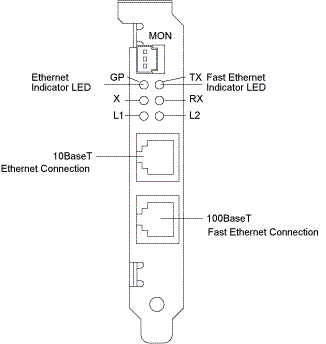
There are 6 LEDs at the front of the adapter set out in two
columns and three rows.
The first row indicates the Ethernet port chosen, L2 for
Ethernet 10BaseT and L1 for Fast Ethernet 100BaseTX.
Row two indicates communication-RX (receiving) and TX
(transmitting).
Row three indicates diagnostics.
Only one port
can be connected at any one time. To change physical connections, perform
the change and then restart the Brisque or CreoScitex Ripro Archiver or
CreoScitex Ripro Server.