Home | Contact Us | Submit Troubleshooting Info | Search | Help
Output | Software Solutions | Proofing | Color, Screening and Calibration | Scanning | Digital Photography | Consumables | POS
Home | Contact Us | Submit Troubleshooting Info | Search | Help
Output | Software Solutions | Proofing | Color, Screening and Calibration | Scanning | Digital Photography | Consumables | POS
As most of you know, when you print Word documents to the Brisque, the text will be CMY instead of Black. this is because Microsoft uses RGB 0,0,0 for black text.
To work around this problem in Brisque v2.x you must use Acrobat Distiller.
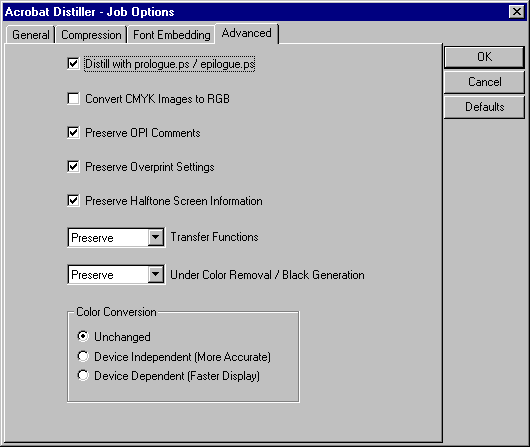
There are a number of settings you need to set in the Distiller job Option. Attached is a screen dump showing the settings.
You also need to copy the "Epilogue.ps" and "Prologue.ps" from the Distiller "high-end" folder (inside the "XTras" folder) to the same folder as the distill executable.
Once you have made a PDF you can RIP this directly on the Brisque (providing you have the PDFRIP update installed) or you can print PostScript directly from Reader/Exchange.
It should be possible to do this directly on Brisque with v3 using the normalizer atom.