The Brisque platforms 43P and F50 are now manufactured with
a new IBM – FE board. This board replaces the 3COM – FE board.
For 43P the driver is available and can be loaded from the
Brisque CD-ROM Version 2.2A and up.
For F50 the driver is available and can be loaded from the
Brisque CD-ROM Version 2.8 and up.
For E30 the board can be used as a spare part and for
Brisque version 2.2 (2.2.79.2) a driver installation is required, you can get the driver
by:
Upgrading to Brisque version 2.2A or 2.8.
Using the diskette driver supplied in the
CreoScitex kit P/N - 510K50715A.
Using IBM CD – "Additional Device Software"
supplied when purchasing the board locally
Overview
The 10/100Mbps Ethernet – TX PCI adapter is a 32-bit
high-performance expansion adapter card for systems adhering to the Peripheral Component
Interconnect (PCI) and IEEE 802.3 standards.
The adapter connects the system to Ethernet LAN at either
10Mbps or 100Mbps data rate.
The 10/100Mbps Ethernet – TX PCI adapter provides the
following features:
Easy installation and automatic configuration
16MHz to 33MHz PCI bus speeds
3 LED adapter status indicators
Auto negotiation of 10Mbps or 100Mbps
Half-duplex or full-duplex operation
64KB on-card FIFO for transmit and receive
An RJ-45 for connecting to UPT or STP cabling
Operation in 64-bit PCI-bus motherboards as a 32-bit device
Surface mount (SMT) and pin-in-hole (PIH)technology
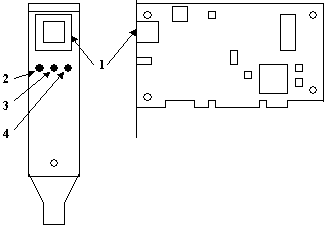
The 10/100Mbps Ethernet-TX PCI Adapter
RJ-45 connector.
Activity LED (green) - Packets are being received or
transmitted over the network.
FDX LED (green) - The adapter is operating in full-duplex
mode.
100 LED (yellow) - The adapter is operating at 100Mbps data
rate.
Logistics Spare Part
The board is available under stand-alone part number 605B00320 and also part of
service kit 510K50715A.
The 510K50715A KIT contains:
399Z50740B
IBM PCI F.E.ADAPTER INST.GUIDE (will be available soon).
501V51097
IBM 10/100BT DRIVER AIX 4.1.5
501V51098
IBM 10/100BT DRIVER AIX 4.2.1
605B00320
IBM 10/100 BT ETHERNET BOARD
Installing the Device Driver
The driver can be installed from the Brisque CD-ROM Version
2.2A or 2.8 or from a diskette media, for AIX 4.1.5 or AIX 4.2.1 respectively.
To install the device driver:
At the system prompt, login as a root user.
Insert the device driver media into the appropriate media
device.
To start SMIT type smit
devinstand press Enter. The
Install Additional Device Software paneldisplays. TheINPUT
device/directory for software option
is highlighted for selection.
Press [F4] to display a list of input devices from which you can select. The
cursor is already positioned on the input device entry field.
Either type the name of the input device in the entry field or select the appropriate
device, then press Enter. The Install Additional Device Software panel
displays the device you selected in the INPUT device/directory for software
field. The SOFTWARE to install option is highlighted.
Press [F4] to display a list of device packages you can install.
Type / for Find.
Type devices.pci.23100020 and press Enter.
Press [F7] to select the device package name and press Enter. The
Install Additional Device Software paneldisplays the completed required fields.
Press Enter. TheARE YOU SURE list displays.
Press Enter. The COMMAND STATUS panel displays. The term RUNNING
is highlighted, indicating, indicating that the software is being installed.
When RUNNING changes to OK, scroll down
to the bottom of the panel and locate the Installation Summary. If the installation
was successful, SUCCESSappears at the bottom of the panel in the
Result column of the Installation Summary.
Remove the device driver software media from the media device.
Press [F10] to exit SMIT.
Type shutdown -Fr to shut down and restart your system, then
press Enter.
Installing the Adapter
Follow your operating system instructions for shutting down
your system, then turn off the power to your system unit. On an AIX system,
Type shutdown-Fand press Enter.
When halt completed displays, turn the system unit
power off and unplug the power cord from the wall outlet.
Remove the covers of your system unit. Follow the instructions provided in your
system unit documentation.
Install the adapter in your system unit. Follow the installation guide for the
slot location according to the platform.
Follow the directions provided in your system unit documentation to reinstall the covers
of your system unit.
Plug the power cord back into the wall outlet.
Connect the twisted-pair network cable to the RJ-45 connector.
Turn the power on to your system unit so that the operation system can update the system
configuration.
Verifying the Installation:
To verify the installation on an AIX system, type:
lsdev -Cs pci at the
system prompt and press Enter.
A list of PCI devices displays.
An Available status indicates that the adapter is
installed and ready to use.
Example:
ent1 Available 04-02 IBM 10/100 Mbps Ethernet PCI Adapter
(23100020)