

Home | Contact Us | Submit Troubleshooting Info | Search | Help
Output | Software Solutions | Proofing | Color, Screening and Calibration | Scanning | Digital Photography | Consumables | POS
Home | Contact Us | Submit Troubleshooting Info | Search | Help
Output | Software Solutions | Proofing | Color, Screening and Calibration | Scanning | Digital Photography | Consumables | POS
A new option, Fill CT Gaps With, has been added to the RIP menu for CT handling.
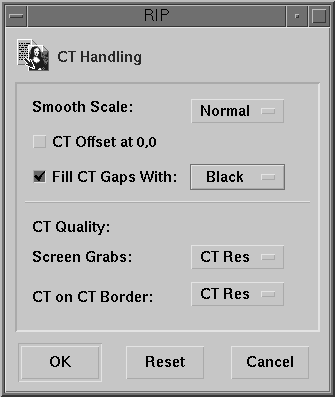
This option, which is included in the RIP
4.1 Update and ReadMe files, is useful when the RIP operation combines several
CTs into one single CT that fits the page size. When the checkbox is selected,
it fills the gap areas of the single CT with either black or white (depending
on the selection). These gaps were always filled with black in the past, which
in some cases left black hairline artifacts visible in the final page (in the
LW window borders).
Note: When CT on CT Border is selected (lw res or SmartEdge),
the operation of the Fill CT Gaps With option is not affected.
To see the difference between the modes, preview the CT within the page created by RIPing a sample file into three jobs: