Home | Contact Us | Submit Troubleshooting Info | Search | Help
Output | Software Solutions | Proofing | Color, Screening and Calibration | Scanning | Digital Photography | Consumables | POS
Home | Contact Us | Submit Troubleshooting Info | Search | Help
Output | Software Solutions | Proofing | Color, Screening and Calibration | Scanning | Digital Photography | Consumables | POS
Technical Notes
MemosBrisque - Improof Configuration Script "start.printer_config"
M. Anderson
December 17, 1997SOFTWARE LOADING
This update comprises a new start.printer_config script. This script sets the configuration of the centronics port on the Brisque. It is not possible to see if the script is installed by using the normal Scimit - Display Software Versions command. Details for checking the installation are given, in this guide, after the installation procedure.
- Using a Macintosh, copy the new script to one of the Brisques dataVolumes: e.g. brisque1.1.0
- From a UNIX shell run the following commands - (make sure the correct dataVolume name is inserted in place of brisque1.1.0 in the example below:
# cd $SCI_SCRIPTS
# mv start.printer_config start.printer_config.orig
# mv /dataVolumes/brisque1.1.0/start.printer_config start.printer_config
# chown root.system start.printer_config
# chmod 755 start.printer_config
- Logout from the CDE.
- Login as cdesci.
VERIFY UPDATE INSTALLATION
- Enter smit
- From the Smit main menu select Devices and press Enter
- Select Printer/Plotter and press Enter.
- Select Printer/Plotter Devices and press Enter.
- Select Change / Show Characteristics of a Printer/Plotter and press Enter.
- Select lp0 and press Enter.
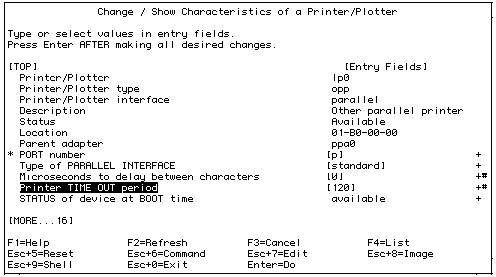
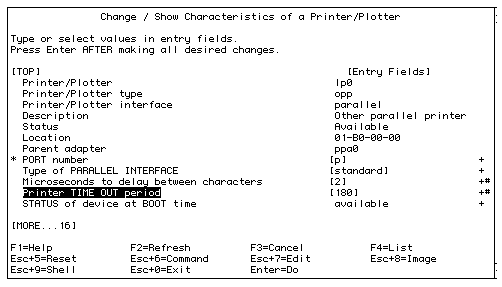
- Check Printer TIME OUT period (New value is 180).
Before
After