Home | Contact Us | Submit Troubleshooting Info | Search | Help
Output | Software Solutions | Proofing | Color, Screening and Calibration | Scanning | Digital Photography | Consumables | POS
Home | Contact Us | Submit Troubleshooting Info | Search | Help
Output | Software Solutions | Proofing | Color, Screening and Calibration | Scanning | Digital Photography | Consumables | POS
Product |
Brisque 4.0 |
||
Platform |
|
||
Operating system |
IBM AIX 4.3.3 |
||
Background |
In Brisque 4.0, problems have occurred when adding the version name to the plate, when dentifying the different version languages. The following solution:
This is a temporary solution. A final solution will be implemented in a future Brisque version. |
||
Requirements |
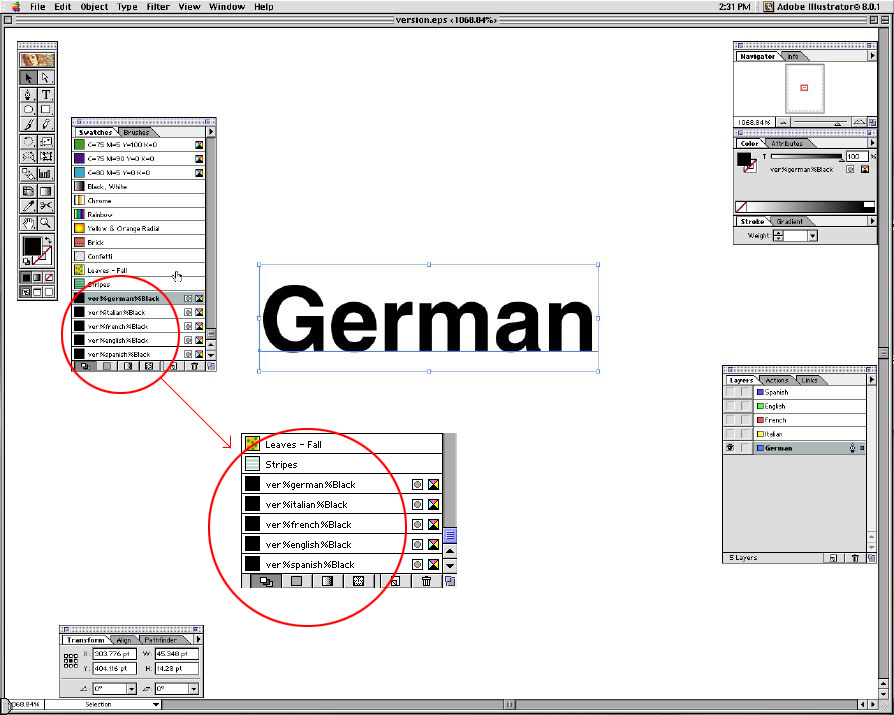
Download the versioning.eps (202KB) file. If opening the versioning.eps file, in Adobe Illustrator, note that it contains just the Versions names, one on top of the other. Each version name is defined as a spot color with a unique name—for example, ver%english%Black. ver%english is the version name. %Black is the separation this version should be exposed with. See the image below. When using this procedure you must ensure that:
If the number and names of versions change from one versioning job to another, edit the versioning.eps file in Adobe Illustrator™. |
||
Procedure |
Important: Version names in the versioning.eps file that are not used in the versioning job are also exposed. For each additional version name, a blank plate is exposed with only the version name on it. |
||
Images |
|
||
Technical contact(s) |
|||
Submitted by |
Oren Keinan and Michael Oetjen |
||
Date submitted |
11 June 2002 |
||