Home | Contact Us | Submit Troubleshooting Info | Search | Help
Output | Software Solutions | Proofing | Color, Screening and Calibration | Scanning | Digital Photography | Consumables | POS
Home | Contact Us | Submit Troubleshooting Info | Search | Help
Output | Software Solutions | Proofing | Color, Screening and Calibration | Scanning | Digital Photography | Consumables | POS
|
|
|||
Product |
|
||
Platform |
|
||
Operating system |
|
||
|
|
|||
Symptoms |
Ethershare volumes mounted on the Mac OS X desktop disappear occasionally. |
||
|
|
|||
Cause |
The clients may be in “sleep” mode. |
||
|
|
|||
Solution |
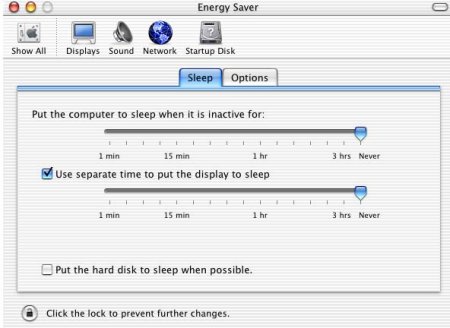
To workaround this problem, ensure that Sleep mode is disabled on Macintosh computers mounting Ethershare volumes. To disable Sleep mode:
|
||
|
|
|||
Technical contact(s) |
|||
Submitted by |
|||
Date submitted |
08 Sep 2003 |
||