Home | Contact Us | Submit Troubleshooting Info | Search | Help


    Output | Software Solutions | Proofing | Color, Screening and Calibration | Scanning | Digital Photography | Consumables | POS


6F1 stops responding or restarts when error message E500 appears


Product

 
  • Brisque® 4.1
  • Brisque 5
  • Brisque Serve 4

Platform


6F1 - Condor (2,4 and 6 CPUs)

Operating system


IBM® AIX® 4.3.3 or IBM AIX 5


Error


E500


Symptoms


6F1 server stops responding or restarts when error E500 appears.


Cause


Possible power supply or CPU failure.


Solution


Check the power supply. If the machine starts up, but then stops responding, do the following:

  1. Connect a laptop computer to the Brisque workstation via a RS-232 cable.
    1. Ensure that the Brisque workstation starts up at a normal speed.
    2. Read the service processor error logs, and then clear all the errors.
    3. Read the system POST errors, and then clear all the errors.
    4. Ensure that all the CPUs displayed in the Processor Configuration/Deconfiguration menu are configured.
    5. Ensure that all the memories displayed in the Processor Configuration/Deconfiguration menu are configured.
  2. Disconnect the laptop computer from the Brisque workstation.
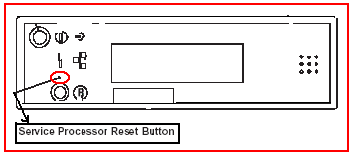
  3. When the OK prompt displays in the Operation panel, reset the service processor using a small needle, as shown:

  1. After you have reset the processor, press the Service Processor Reset button in the Operation panel, digits appear in the LCD panel. When the digits finish displaying in the LCD panel, the OK prompt redisplays.
  2. Start the Brisque workstation, then log on. At the command line, type errclear 0.
    Note: Each time the Brisque workstation stops responding and restarts without solving the problem, it will perform a slow start. After the problem has been resolved, it will automatically fast start the next time restarting is required.


Technical contact(s)
 

Lev Weissman

Submitted by
 

Lev Weissman

Date submitted
 

20 Oct 2003


    Copyright © 2005 Creo Inc. All rights reserved. Confidential. Back to top.