Home | Contact Us | Submit Troubleshooting Info | Search | Help
Output | Software Solutions | Proofing | Color, Screening and Calibration | Scanning | Digital Photography | Consumables | POS
Home | Contact Us | Submit Troubleshooting Info | Search | Help
Output | Software Solutions | Proofing | Color, Screening and Calibration | Scanning | Digital Photography | Consumables | POS
Product |
|
||
Platform |
F50—Wildcat (4 CPUs) |
||
Operating system |
IBM® AIX® 4.2.1 or AIX 4.3.3 |
||
Error |
One of the following error codes: |
||
Symptoms |
Brisque F50 with 2 processor boards (4 CPUs), does not reboot properly.
The system will reboot 3 consecutive times, each time displaying one of
the above error codes. After the third attempt, the error |
||
Cause |
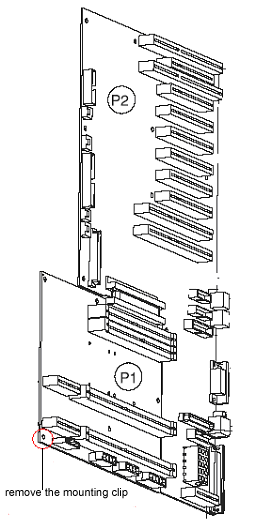
The mounting clip that secures the screw at the lower left corner of the System card (the smaller backplane card where the processors are inserted) touches 2 resistors on the System card. |
||
Solution |
Perform the following steps:
|
||
Technical contact(s) |
|||
Submitted by |
|||
Date submitted |
02 June 2004 |
||