Home | Contact Us | Submit Troubleshooting Info | Search | Help
Output | Software Solutions | Proofing | Color, Screening and Calibration | Scanning | Digital Photography | Consumables | POS
Home | Contact Us | Submit Troubleshooting Info | Search | Help
Output | Software Solutions | Proofing | Color, Screening and Calibration | Scanning | Digital Photography | Consumables | POS
Product |
|
||
Platform |
Macintosh® |
||
Operating system |
Mac OS® 9.x, 10.x |
||
Symptoms |
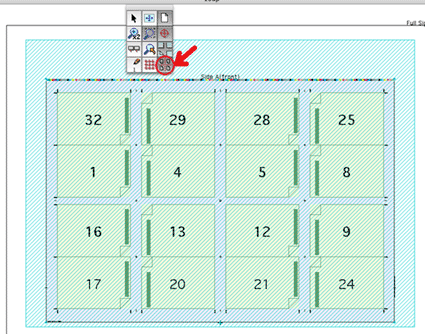
Marks in the bottom margin of ICF files do not appear when printing to a Dolev 800V2. To view the exposable area in reference to the layout, click the icon that is highlighted in the image below. The larger rectangle in the image shows the exposable area and the inner rectangle is the layout.
|
||
Solution |
To solve this problem, a new PPD was created
where the exposable area for the Dolev 800V2 was shifted down
to allow a wider bottom margin. To install the PPD:
The Preps PPD can be downloaded directly from TechPlanet, from the Brisque Downloads page. |
||
Technical contact(s) |
|||
Submitted by |
|||
Date submitted |
03 Nov 2004 |
||