Home | Contact Us | Submit Troubleshooting Info | Search | Help
Output | Software Solutions | Proofing | Color, Screening and Calibration | Scanning | Digital Photography | Consumables | POS
Home | Contact Us | Submit Troubleshooting Info | Search | Help
Output | Software Solutions | Proofing | Color, Screening and Calibration | Scanning | Digital Photography | Consumables | POS
Product |
Brisque® 5.x |
||
Platform |
All Brisque platforms |
||
Operating system |
IBM® AIX® 5.2 |
||
Symptoms |
RIPing multi-page jobs in Brisque 5.0 takes a long time to complete. |
||
Cause |
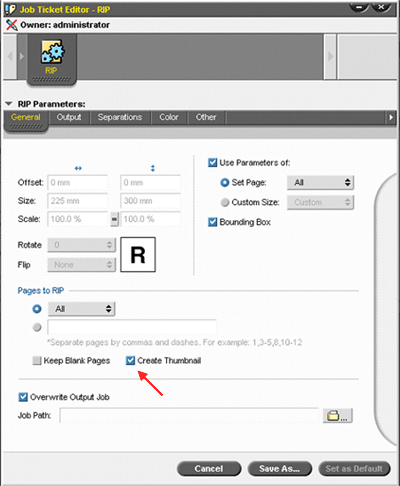
The Create Thumbnail option in the RIP dialog box is selected by default in Brisque 5.0. This option creates thumbnails for all the job pages and increases the RIP time. |
||
Solution |
In Brisque 5.1, clear the Create Thumbnail option in the RIP dialog
box, thus shortening the RIP process time. |
||
Technical contact(s) |
|||
Submitted by |
|||
Date submitted |
20 Sep 2005 |
||