Home | Contact Us | Submit Troubleshooting Info | Search | Help
Output | Software Solutions | Proofing | Color, Screening and Calibration | Scanning | Digital Photography | Consumables | POS
Home | Contact Us | Submit Troubleshooting Info | Search | Help
Output | Software Solutions | Proofing | Color, Screening and Calibration | Scanning | Digital Photography | Consumables | POS
|
|
|||
Product |
|
||
Platform |
|
||
Operating system |
IBM®AIX 4.2.1 and IBM AIX 4.3.3 |
||
|
|
|||
Error |
 !Dbspace is off. Check chunks
status.:: eom :: |
||
|
| |||
Symptoms |
When Informix comes up, the above error message appears. | ||
|
|
|||
Cause |
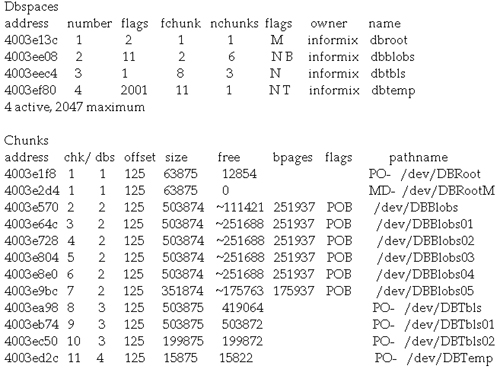
A DBRootM database chunk becomes unusable. | ||
|
|
|||
Solution |
Replace the unusable DBRootM database chunk with its copy, which is stored on the mirrored volume.
|
||
|
|
|||
Technical contact(s) |
|||
Submitted by |
|||
Date submitted |
03 Apr 2003 |
||