Home | Contact Us | Submit Troubleshooting Info | Search | Help


    Output | Software Solutions | Proofing | Color, Screening and Calibration | Scanning | Digital Photography | Consumables | POS


HFDaemon process fails and creates core files


Product

 
  • Brisque® Serve 4.0
  • Brisque 4.0
  • Timna™ 3.0

Platform

 
  • E30—Victory
  • 43P–140—Tiger1
  • 43P–150—Tiger2
  • F50—Wildcat (2 and 4 CPUs)
  • 44P–170—Hammerhead
  • 6F1—Condor (2, 4, and 6 CPUs)

Operating system


IBM® AIX 4.2.1 or 4.3.3


Symptoms


The HFdaemon process that was running fails, and core files are created.


Cause


One of the files contained in a specific file system is damaged and causes the process to fail.


Solution

Identify the failed process and damaged file that is contained in a specific file system, and then remove or replace the damaged file.

  1. Run the errpt command. The following information appears on-screen:

    • Serial number of the file system
    • Inode number of the problematic file
    • Program name (the process which has failed)


    This is an example of what appears on-screen after you run the the errpt command:

    FILE SYSTEM SERIAL NUMBER
    11
    INODE NUMBER
    23
    PROGRAM NAME
    HFdaemon

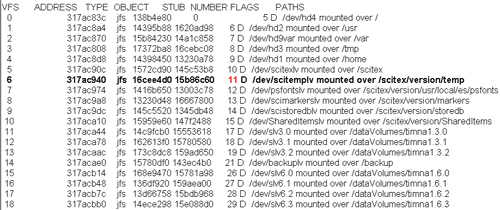
  2. Run the command echo vfs|crash to display a VHS table, which includes a list of all the file system serial numbers, as indicated in the following example:


  3. In the VHS table (see above), navigate through the NUMBER column to the file system serial number that was identified by the errpt command.

    In the above example, the serial number of the problematic file system is number 11, and the problematic file system is identified as /scitex/version/temp.
  4. Run the command
    find <problematic file system> -inum <inode number>
    .
    For example, run the command
    find /scitex/version/temp /-inum 23.
  5. Remove or replace the damaged file.

Technical contact(s)
 

Lev Weissman

Submitted by
 

Lev Weissman

Date submitted
 

15 May 2003


    Copyright © 2005 Creo Inc. All rights reserved. Confidential. Back to top.