

Home | Contact Us | Submit Troubleshooting Info | Search | Help
Output | Software Solutions | Proofing | Color, Screening and Calibration | Scanning | Digital Photography | Consumables | POS
Home | Contact Us | Submit Troubleshooting Info | Search | Help
Output | Software Solutions | Proofing | Color, Screening and Calibration | Scanning | Digital Photography | Consumables | POS
Product |
Pandora® 1.0 |
||
Operating system |
Macintosh® |
||
Error |
|
||
Symptoms |
Upon startup of Pandora, a warning dialog appears that shows ~ATM™ and an OK button. After you click OK, the box clears but Pandora does not launch. |
||
Cause |
The system requirements for Pandora specify 256 MB of RAM just for Pandora. If there is insufficient RAM, this dialog box appears. |
||
Solution |
If there is less than 256 MB of RAM available for Pandora (not including the operating system and any other software that may be running), you can either add more memory to the computer, or change the Virtual Memory settings. To change the Virtual Memory settings: 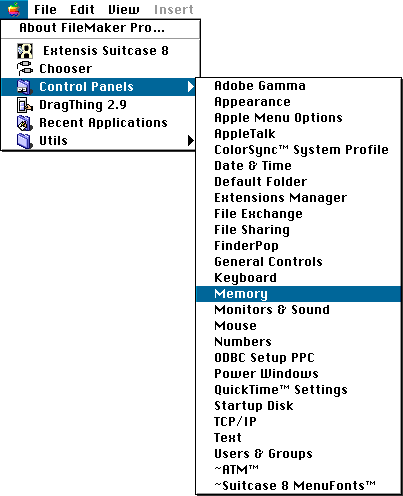 Click to enlarge 2. Under Virtual Memory, select On. 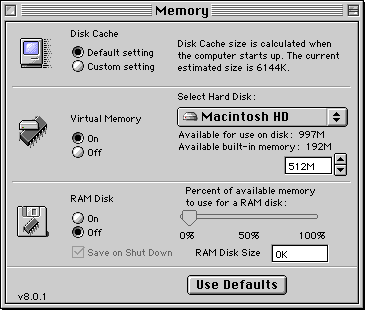 Click to enlarge |
||
Date submitted |
26 Mar 2003 |
||