

Home | Contact Us | Submit Troubleshooting Info | Search | Help
Output | Software Solutions | Proofing | Color, Screening and Calibration | Scanning | Digital Photography | Consumables | POS
Home | Contact Us | Submit Troubleshooting Info | Search | Help
Output | Software Solutions | Proofing | Color, Screening and Calibration | Scanning | Digital Photography | Consumables | POS
Product |
Pandora® All |
||
Operating system |
Macintosh® & Windows® |
||
Symptoms |
Complete Title: PDF Files Created from QuarkXPress PostScript Files Using the “Print to File” Method Do Not “Snap to Die” Correctly in Pandora When you use the “print to file” method to create a PostScript® file from a QuarkXPress® document, having the registration marks enabled causes Pandora's “snap to die” feature to incorrectly position the file. |
||
Cause |
The PostScript code that QuarkXPress generates does not contain the correct information about the trim size of the page when registration marks are enabled. |
||
Solution |
There are two workarounds for this problem. Workaround 1: 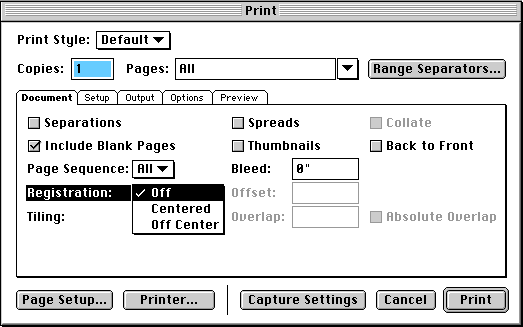 Click to enlarge Workaround 2: |
||
Technical contact(s) |
|||
Submitted by |
|||
Date submitted |
28 Nov 2001 |
||