

Home | Contact Us | Submit Troubleshooting Info | Search | Help
Output | Software Solutions | Proofing | Color, Screening and Calibration | Scanning | Digital Photography | Consumables | POS
Home | Contact Us | Submit Troubleshooting Info | Search | Help
Output | Software Solutions | Proofing | Color, Screening and Calibration | Scanning | Digital Photography | Consumables | POS
Product |
Pandora® All |
||
Operating system |
Macintosh® & Windows® |
||
Symptoms |
Complete Title: Pandora Does Not Preview Transparency in the JIV; Transparency is Disregarded When Printing to PostScript PDF 1.4 files that contain transparent objects do not preview correctly in the JIV. |
||
Cause |
The PostScript language does not recognize transparency, and in order to preview files in the JIV, they must be converted to PostScript. |
||
Solution |
There are two workarounds for this problem: Solution 1: Solution 2: 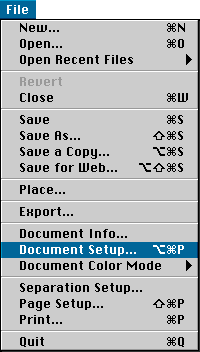 Click to enlarge 3. From the list at the top of the dialog box, select Transparency. 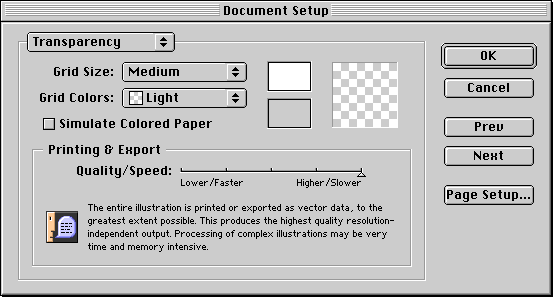 Click to enlarge 6. Export the PDF, then place it into Pandora. |
||
Technical contact(s) |
|||
Submitted by |
|||
Date submitted |
11 Feb 2002 |
||