Symptoms |
|
Pandora is a hardware-key protected application. The iKey USB hardware key requires the iKey™ driver. This driver should install automatically when you install the software. However, sometimes there is a problem with the iKey driver installation on Windows® 2000 systems because there are still references to a previously installed driver present. This can happen if the hardware key is inserted prior to the correct driver being installed. If that happens, Windows 2000 assigns a different, incorrect driver to the hardware key.
|
Solution |
|
Before reinstalling the iKey driver, you must remove all references to previous drivers. At this time, you must manually uninstall the driver to obtain a "clean" system.
We have not yet determined a method for uninstalling drivers that works in all scenarios. However, following are two methods that have worked for many users. Try Method 1 first, as it is the easiest. Try Method 2 at your own risk; removing the wrong files may cause serious problems for which Creo cannot be held responsible.
Method 1:
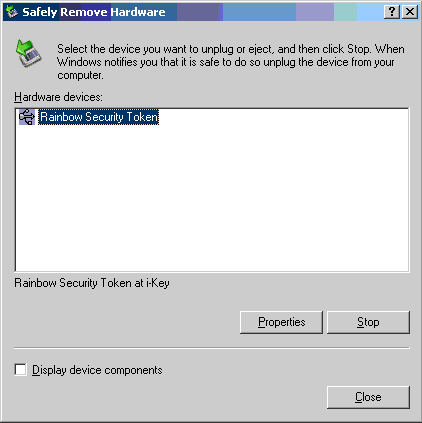
1. When the hardware key is plugged into the machine, an icon with a green arrow appears on the right side of the Windows toolbar. Double-click this Safely Remove Hardware icon.

Click to enlarge
2. Select the incorrectly installed driver.
3. Click Properties.
Click to enlarge
4. Click Uninstall. If a message appears saying it cannot locate the Driver folder, Inf file, and/or System 32 dll file, find each component on the computer.
5. Click OK to exit the dialog box.

Click to enlarge
Method 2: Removing the Rainbow Security Token program:
Note: Leave the hardware key attached to your system.)
1. Go to Start > Settings > Control Panel > Add/Remove Programs.
2. In the Currently installed programs list, look for Rainbow Security Token.
3. If it is present, remove it.
Removing the Rainbow Security Token device:
Note: Leave the hardware key attached to your system.
1. Go to Start > Settings > Control Panel > Add/Remove Hardware.
2. The Add/Remove Hardware Wizard starts.
3. Click Next.
4. Under Choose a hardware task, select Uninstall/Unplug a device.
5. Click Next.
6. Under Choose a Removal Task, select Uninstall a device.
7. Click Next.
8. The Wizard displays a list of all installed devices. Select the Show hidden devices check box.
9. In the list of installed devices, locate and uninstall:
a. The Rainbow Security Token device (near end of the list).
b. Any Rainbow or iKey-related device with a yellow exclamation mark.
Note: You must run the Wizard again if you want to uninstall several devices.
Warning: Uninstall only those devices you know are associated with Rainbow (devices called iKey or Rainbow).
Step 1
1. Physically remove the hardware key from your system.
2. Go to Start > Run. The Registry Editor dialog box opens.
3. Type regedit, then click OK.
4. Select the following entry, if it exists, then from the Edit menu, select Delete:
HKEY_LOCAL_MACHINE\SYSTEM\ControlSet001\Services\RNBTOKEN
Step 2
1. Use Explorer to go to the folder called "C:\WINNT\INF"
Note: It may be hidden on the computer system; from the Tools menu, select Folder options. Select the View tab. Under Advanced, select Show hidden files and folders.
2. In this folder you must delete the following files:
a. “RNBTOKEN.INF”
b. “RNBTOKEN.PNF”
3. It may also be necessary to remove:
a. "OEMxx.INF"
b. "OEMxx.PNF" (with xx being a number).
To determine which files to remove you must open every "OEMxx.INF" file with a text editor such as TextPad. If it contains the following text ,you can safely delete the INF file and its corresponding PNF file:
;*******************************************************************
;* RNBTOKEN.INF
;*
;* Rainbow iKey Token Driver Installation File.
;*
;* (C) Copyright 1999 Rainbow Technologies, Inc.
;*
;*******************************************************************
Step 3
1. Use Explorer to go to the folder "C:\WINNT\SYSTEM32\DRIVERS"
2. Delete file "RNBTOKEN.SYS".
3. Reboot the system. You should have a clean system now to perform a fresh installation.
|

