Home | Contact Us | Submit Troubleshooting Info | Search | Help
Output | Software Solutions | Proofing | Color, Screening and Calibration | Scanning | Digital Photography | Consumables | POS
Home | Contact Us | Submit Troubleshooting Info | Search | Help
Output | Software Solutions | Proofing | Color, Screening and Calibration | Scanning | Digital Photography | Consumables | POS
|
|
||
Product |
Prinergy 3.x | |
Platform |
Macintosh |
|
Operating system |
OS X |
|
|
|
||
Error |
||
|
|
||
Symptoms |
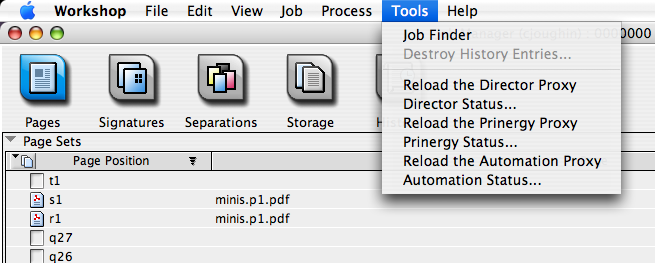
Process templates are visible in the Process menu, but grayed out Tools menu contains entries like Reload the Directory Proxy. See attached screenshot (link below). |
|
|
|
||
Cause |
Sometimes the folder /Library/Application Support/Creo already exists (due to other Kodak (Creo) software being installed.) At other times, this folder will have odd user rights that the Workshop installer has trouble resolving, and therefore it cannot copy the required files to that location. Because of this, Process templates don't show up in Prinergy Workshop. The Tools menu shows Reload DFE Proxy. |
|
|
|
||
Solution |
There are three possible solutions: 1. using the Mac Disk Repair utility's Verify Disk Permissions will often solve this problem. Then re-install Workshop. 2. Remove all traces of the Creo folder structure and reinstall from an administrator account. 3. Copy the following files from ClientAutoUpdate\UpdateFilesOrig (on the server) to Workshop\Contents\Resources\Preferences (on the client): - Automation.dfeproxy - Director.dfeproxy - Prinergy.dfeproxy - Simulator.dfeproxy Permanent fix: |
|
|
|
||
See also |
||
|
|
||
Keywords |
Macintosh, process plans, workshop |
|
|
|
||
Technical contact(s) |
Amy Chan; James Bredenhof; Chris Joughin |
|
Submitted by |
James Bredenhof; Chris Joughin |
|
Date submitted |
02 Mar 2006 |
|