Home | Contact Us | Submit Troubleshooting Info | Search | Help
Output | Software Solutions | Proofing | Color, Screening and Calibration | Scanning | Digital Photography | Consumables | POS
Home | Contact Us | Submit Troubleshooting Info | Search | Help
Output | Software Solutions | Proofing | Color, Screening and Calibration | Scanning | Digital Photography | Consumables | POS
Product |
|
||
Operating system |
Microsoft® Windows® |
||
Error |
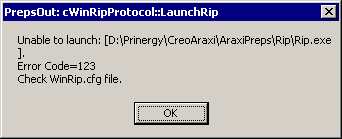
Unable to launch:
|
||
Symptoms |
In Prinergy Workshop on a primary server, you click Start Imposition Application. Preps does not start, and the error message appears.
|
||
Cause |
Incorrect permissions or a corrupted WinRip.cfg file. A less common cause is the WinRip.cfg file containing the wrong path to the Rip.exe file. |
||
Solution |
Rename the WinRip.cfg file. The Prinergy system creates a new and correct copy of the file. |
||
Keywords |
Workshop, Preps, imposition/layout | ||
Technical contact |
|||
Submitted by |
|||
Date submitted |
30 Jun 2008 | ||